Rating: 4.5/5
3Shape TRIOS 6 Wireless Review: Complete Guide For Dental Professionals (2026)
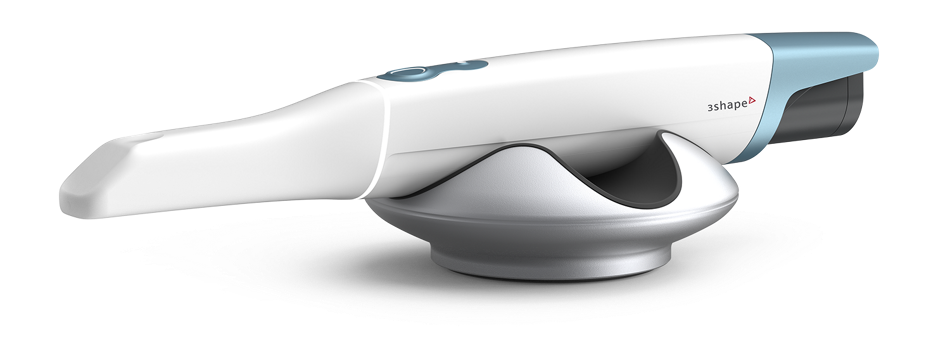
The 3Shape TRIOS 6 Wireless is a premium intraoral scanner that adds hyperspectral imaging and AI-assisted diagnostics to the proven TRIOS 5 platform. Launched in 2025 at $27,900,...
Reviewed by Marcus Hale
Pros
- Up to 110% higher scan resolution versus previous TRIOS models, with clear improvements on preparation margin definition and full-arch geometry
- Dx Plus AI diagnostics are now FDA 510(k) cleared in the USA as of April 28, 2026, enabling clinical use for detection of caries, tooth wear, plaque, and gingival recession
- Multi-source hyperspectral imaging captures white light, fluorescence, and near-infrared data simultaneously with no additional scanning steps
- Reliable wireless performance with 43 minutes of continuous scanning per charge and three batteries included
- Photo-realistic color rendering supports accurate shade communication with dental laboratories and improves patient consultation
- Superior edentulous scanning compared to leading competitors, making it suitable for denture workflows and full-mouth rehabilitation
- Open ecosystem with STL, PLY, and OBJ export, supporting broad lab compatibility and avoiding vendor lock-in
- Comprehensive first-year TRIOS Care included, covering support, training, warranty, and express scanner replacement
- Unite Cloud access means scans, patient data, and licenses are available from any device without local server installation
Cons
- Premium base price of $27,900 USD, positioning it at the top of the intraoral scanner market alongside the iTero Lumina
- Dx Plus requires an additional $199/month subscription on top of the scanner cost, adding a meaningful recurring expense
- Hardware is largely unchanged from the TRIOS 5, which makes the upgrade less compelling for existing TRIOS 5 users who primarily scan for impressions
- Dx Plus AI output is assistive rather than a standalone diagnostic, requiring clinical interpretation alongside physical examination and radiographic findings
- Learning curve of two to four weeks for practices new to the 3Shape ecosystem, with full proficiency developing over two to three months
- Wireless performance depends on proper network configuration, including correct router channel selection, and requires troubleshooting in some practice environments
- TRIOS Care premium support requires renewal after the first complimentary year, adding to the total cost of ownership over time
The 3Shape TRIOS 6 Wireless is a premium intraoral scanner that adds hyperspectral imaging and AI-assisted diagnostics to the proven TRIOS 5 platform. Launched in 2025 at $27,900, it targets practices investing in preventive care and patient education. This review covers clinical performance, pricing, troubleshooting, and how it compares to the competition.
TL;DR
The TRIOS 6 Wireless delivers up to 110% higher scan resolution than previous TRIOS models, powered by multi-source hyperspectral imaging
Dx Plus AI diagnostics received FDA 510(k) clearance in the USA on April 28, 2026, enabling clinical use for caries, tooth wear, plaque, and gingival recession detection
Base price is $27,900, with Dx Plus at $199/month and first-year TRIOS Care included at no additional cost
Best suited for high-volume restorative practices and clinics building preventive care programs around patient engagement and documented oral health monitoring
Technical Specifications And Key Features
The TRIOS 6 Wireless is built on the same ergonomic chassis as the TRIOS 5, with meaningful software and imaging upgrades rather than a hardware overhaul. Understanding its specifications helps practices assess whether the investment aligns with their clinical requirements.
Scanner Hardware And Connectivity
The wand weighs 308 grams and measures 3.8 x 3.9 x 26.6 cm, maintaining the familiar TRIOS profile. A refined remote control button addresses the accidental activations reported with the TRIOS 5.
Battery: up to 43 minutes of continuous scanning, three batteries included, 80% charge in approximately 60 minutes
Wireless: TP-Link adapter using Wi-Fi, WPA2 and WPA3 supported, recommended channels 36-48 on the 5 GHz band
Imaging: three simultaneous light sources, white light, fluorescence at 405 nm, and near-infrared at 850 nm
Resolution: up to 110% higher than previous TRIOS generations across the full scan field
Package includes: scanner wand, pod, 100 sleeves, 25 TRIOS Ready Tips, one autoclavable tip, one protection tip, three batteries and charger, wireless receiver, and setup guides
Software Platform And Integration
The TRIOS 6 runs on Unite 24.1 and later, operating dongle-free from delivery. The Unite 25.2 release introduced Dx Plus, the DentalHealth patient app, dynamic zoom in the scanning overview, and Unite Cloud, providing access to scans, patient data, and licenses from any device.
Practice Management Integration with 60+ systems, available for all TRIOS models except TRIOS Core
Open file export in STL, PLY, and OBJ formats for broad lab compatibility
3Shape Unite connects to thousands of lab partners worldwide with cloud case management
Invisalign connection available for TRIOS 6 (not available in the USA on the TRIOS 3)
Connecting TRIOS 6 scan data with a structured dental treatment plan helps clinicians document clinical findings alongside patient-reported concerns, creating a clear audit trail that supports pre-authorization and patient education workflows.
Clinical Performance
Clinical performance across scanning speed, wireless reliability, ergonomics, and image quality determines whether the TRIOS 6 delivers on its premium pricing in a real practice environment.
Scanning Speed And Accuracy
Single crown impressions, including opposing arch and bite registration, complete in approximately 45 seconds with experienced technique. Full-arch scans typically require two to three minutes for trained operators. The scanner's real-time feedback displays captured areas in color while indicating regions requiring additional data in white, supporting efficient gap-filling without over-scanning.
Peer-reviewed research comparing TRIOS models found trueness of 20.8 ± 6.2 micrometers for full-arch scans in controlled testing. The enhanced resolution of the TRIOS 6 is expected to produce comparable or improved accuracy, particularly on subgingival preparations with proper tissue management.
Wireless Performance And Ergonomics
Connection stability is reliable when following 3Shape's recommended network configuration, with consistent data transmission at up to 15 feet from the wireless adapter under typical clinical conditions. The refined remote control button is a meaningful ergonomic improvement over the TRIOS 5. Battery life covers a full morning or afternoon session without interruption for most practices, and the three-battery package supports high-volume days through rotation.
Image Quality And Diagnostic Capabilities
Color accuracy for shade matching reflects photo-realistic rendering that improves laboratory communication and patient consultation. Margin definition is clear in both color and monochrome modes. The multi-source imaging system captures white light, fluorescence, and near-infrared data simultaneously, integrating into CAD/CAM workflows without adding scanning time.
Pricing And Total Cost Of Ownership
Understanding the complete financial picture of the TRIOS 6 requires looking beyond the base hardware cost. Configuration choices, ongoing subscriptions, and the first-year TRIOS Care inclusion all affect what practices pay over a two-to-five-year ownership horizon.
Purchase Costs And Configuration Options
The table below reflects 3Shape's published pricing as of early 2026. Prices may vary by region and reseller, and promotional upgrade pricing is available for existing TRIOS owners. Always confirm current pricing directly with your reseller before purchasing.
Item | Cost (USD) | Notes |
|---|---|---|
TRIOS 6 Wireless (scanner only) | $27,900 | Base hardware price |
Dell Workstation laptop (certified) | +$3,150 | Pre-configured, 3-year support |
MOVE Pro cart | +$8,000 | Mobile workstation with screen and battery |
First-year TRIOS Care | Included | Support, training, warranty, express replacement |
Dx Plus subscription | $199/month or $1,990/yr | AI diagnostics, TRIOS 6 scans only |
Dx Standard subscription | Separate pricing | Manual tracking, compatible with TRIOS 3, 5, and 6 |
TRIOS Ready Tips (25-pack) | Per reseller | Single-use sterile sleeves |
Replacement batteries | Per reseller | Three included at purchase |
Operating Costs And Ongoing Subscriptions
After the first complimentary year of TRIOS Care, practices choose between continuing with TRIOS Care for premium support and express replacement, or switching to the TRIOS Only plan at no monthly cost. The Dx Plus subscription at $199 per month is the most significant ongoing expense for practices using the diagnostic platform regularly. Tip consumption depends on practice volume and tip selection: TRIOS Ready Tips offer single-use sterility assurance, while the autoclavable tip reduces per-patient consumable costs for high-volume practices.
Return On Investment
Practices performing five digital impressions daily can save approximately $1,750 annually in impression material and shipping costs. Digital impressions typically complete two to three minutes faster than conventional alternatives, with immediate quality verification eliminating retake scheduling. The 3Shape ROI calculator allows practices to model their specific case mix and volume, with many practices achieving payback within 12 to 18 months.
TRIOS 6 Versus Competing Scanners
Selecting a premium intraoral scanner requires comparing the TRIOS 6 against the alternatives most practices shortlist at this price tier. The comparison table below summarizes key differentiators. For in-depth coverage of each competing product, dedicated reviews are linked from the column headers.
Feature | TRIOS 6 | |||
|---|---|---|---|---|
Starting price | $27,900 | $25,900 | ~$30,000 | $24,995 |
AI diagnostics | Dx Plus (FDA cleared) | ScanAssist | ScanAssist | None |
Caries detection | Surface + proximal | Surface | Surface + NIR | Surface + NIR |
Weight | 308 g | ~280 g | ~350 g | 542 g |
Connectivity | Wireless | Wireless | Wireless | Wireless cloud |
Open file export | STL / PLY / OBJ | STL / PLY / OBJ | STL | STL / PLY |
Invisalign connection | Yes | Yes | Yes | Yes |
Offline scanning | Yes | Yes | Yes | No (cloud only) |
TRIOS 6 Versus TRIOS 5: Is The Upgrade Worth It?
The TRIOS 5 and TRIOS 6 share nearly identical hardware, and the upgrade decision is almost entirely a software question. The TRIOS 6 adds up to 110% higher resolution, multi-source hyperspectral imaging, Dx Plus compatibility, the DentalHealth patient app, and a refined remote button. The $2,000 price gap reflects these software and imaging enhancements.
Existing TRIOS 5 users primarily using the scanner for impression capture may find it difficult to justify the upgrade on resolution alone. Those actively building preventive programs with documented oral health tracking have a clearer case for the TRIOS 6 now that Dx Plus holds FDA clearance in the USA.
TRIOS 6 Versus iTero Lumina
The iTero Lumina, at approximately $30,000, is the most direct competitor. The Lumina offers a native Invisalign integration that practices with high aligner volume find compelling. TRIOS 6 advantages include superior edentulous scanning, a more compact wand for posterior access, photo-realistic color rendering, open ecosystem compatibility, and FDA-cleared AI diagnostics. Practices serving multiple aligner providers benefit from TRIOS's open architecture.
TRIOS 6 Versus Medit i700 And i900
The Medit i700 and Medit i900 provide strong clinical value at $18,000 with no mandatory subscription. TRIOS 6 advantages over Medit include higher resolution, superior edentulous scanning, FDA-cleared AI diagnostics, and comprehensive first-year TRIOS Care. Budget-sensitive practices that do not require advanced AI diagnostics often find the Medit lineup provides excellent value at a meaningfully lower cost.
TRIOS 6 Versus Primescan 2
The Primescan 2 operates as a cloud-native scanner at $24,995, requiring a constant internet connection and DS Core subscription. TRIOS 6 advantages include offline scanning capability, superior ergonomics at 308 grams versus Primescan 2's 542 grams, FDA-cleared AI diagnostics, and open-ecosystem lab workflows. Practices running full chairside CEREC milling may prefer the Primescan 2 for its tighter Dentsply Sirona integration.
Troubleshooting: Common TRIOS 6 Errors And How To Fix Them
The troubleshooting guide below addresses the errors dental professionals most frequently encounter with the TRIOS 6 Wireless, with step-by-step resolution paths for each scenario. For issues not resolved through these steps, 3Shape support is available through the Unite platform or through your reseller's technical team.
Wireless Connection And Pairing Errors
Wireless connectivity problems are the most common category of TRIOS 6 issues. Symptoms include the scanner not appearing in Unite, intermittent disconnections during scanning, lag between capture and display, and failed cloud uploads.
Scanner not appearing in Unite or LED indicator not turning green:
Connect the TP-Link wireless adapter directly to a USB port on the PC, not through a USB hub, which reduces adapter performance
Open Windows services (Win + R, type services.msc, press Enter), locate 3Shape Wireless Service, and confirm it is set to Automatic startup and is running
Navigate to More – Settings – TRIOS – Scanner Management in Unite and verify the serial number matches the physical scanner
Set the router to channels 36-48 on the 5 GHz band, avoiding channels 149-161, which produce weaker signal performance per 3Shape support documentation
Restart the scanner by holding the power button for three seconds, wait 30 seconds, then attempt reconnection
Intermittent disconnections or lag during scanning:
Place the TP-Link adapter in direct line-of-sight with the scanning position, avoiding metal cabinets and sources of electromagnetic interference
Test network throughput from the scanning computer to identify bandwidth congestion from competing devices
Assign the scanning PC to a dedicated VLAN or Wi-Fi network if other devices are competing for bandwidth in the operatory
Update the scanner and Unite software to the current version, as connectivity fixes are frequently included in point releases
Battery And Power Issues
Battery concerns typically appear as faster-than-expected drain, the scanner not powering on, or batteries failing to reach a full charge. Most of these issues respond to proper maintenance and rotation protocols.
The scanner will not power on or shows a low battery immediately after charging:
Remove the battery, wait ten seconds, and reinsert firmly to ensure full contact with the charging contacts
Try a different battery from the charging station to isolate whether the issue is the battery or the scanner
Confirm the charger cable is fully seated at both the charger unit and the power outlet
If the LED indicator remains off with a confirmed charged battery, this indicates a hardware issue requiring service contact
Battery life shorter than expected:
Rotate all three included batteries equally to maintain even wear
Return the scanner to its pod between patients, which conserves battery and maintains calibration
Store batteries at room temperature and avoid exposure to extreme heat or cold
Batteries that no longer achieve the expected runtime after proper charging indicate end-of-life and should be replaced through your reseller
Scanning Quality And Stitching Errors
Stitching errors and quality problems such as missing areas, blurry surfaces, or excessive soft tissue capture typically respond to technique or tip maintenance adjustments rather than hardware intervention.
Frequent stitching failures or double images:
Start from the occlusal surface of molars and sweep toward the anterior, maintaining consistent speed and a 5-15 mm distance from tooth surfaces
Avoid rapid directional changes, which interrupt the scanner's positional tracking and cause stitching artifacts
Inspect the scanner tip under direct light for scratches or debris before each scan, and replace any visibly damaged tips
Enable auto-cleanup in Unite settings to automatically remove surface artifacts after scan capture
Poor capture on terminal molar distal surfaces or subgingival margins:
Increase tissue retraction using retraction cord or paste before scanning subgingival preparations
Approach from the occlusal rather than buccal position for distal molar coverage
Reduce scanning speed when covering difficult posterior anatomy, as slower movement improves coverage in tight spaces
Software Registration And Launch Errors
Software registration and launch errors typically occur after a new installation, a software update, or a computer replacement, preventing Unite from recognizing the scanner or loading correctly.
Unite launches but does not detect the TRIOS 6:
Go to More, then Settings, then click TRIOS, and select Scanner Management, select Add Scanner, and enter the serial number found on the underside of the scanner handle
Run Unite as administrator (right-click the Unite shortcut and select Run as administrator) to ensure it has permissions to communicate with the wireless adapter
Uninstall and reinstall the TP-Link wireless adapter driver if the adapter is not visible in Device Manager under Network Adapters
Verify that Unite version 24.1 or later is installed, as earlier versions do not support TRIOS 6 operation
Unite fails to launch or crashes on startup:
Clear the Unite cache through More, then Settings, and choose Advanced to remove temporary data causing startup instability
Confirm at least 20% free capacity on the system drive, as low disk space causes Unite instability
Close resource-heavy background applications before launching Unite, including video conferencing tools and cloud backup clients
Dx Plus Errors And Analysis Failures
Dx Plus requires an active internet connection and a valid subscription to run AI analysis on TRIOS 6 scans. The steps below address the most common issues when the diagnostic platform does not perform as expected.
Dx Plus analysis not starting after scan capture:
Confirm the Dx Plus subscription is active under Unite, then Store and My Subscriptions, with a valid renewal date showing
Verify internet connectivity from the scanning PC, as Dx Plus analysis requires a connection to 3Shape servers
Confirm the scan was captured with a TRIOS 6 scanner, as Dx Plus is exclusively compatible with TRIOS 6 scans
Restart Unite and re-open the scan from the patient record to trigger a fresh analysis attempt
Dx Plus results appear inconsistent or flag clinically sound areas:
Dx Plus is an AI-assistive tool, and its output must be interpreted in the context of clinical examination and radiographic findings
Ensure the scan is complete and free of significant voids before running Dx Plus analysis, as missing surface data reduces analysis reliability
Use the zoom and overlay fade features in the Dx interface to inspect the raw scan beneath the AI overlay and distinguish genuine findings from scan artifacts
Scan Upload And Lab Connection Errors
Upload failures and lab connection errors prevent completed scans from reaching the laboratory and can disrupt clinical workflow when discovered after a patient has left. These issues are almost always network-related.
Confirm internet connectivity from the scanning PC before retrying the upload
Navigate to the case in Unite and select Retry Upload from the case action menu rather than creating a duplicate case
Verify the receiving lab's Unite ID is entered correctly in the case destination field
For persistent upload failures, export the case as STL files and send via the lab's alternative file submission portal while the connectivity issue is investigated
Confirm the lab's software version supports Unite 25.x files if older lab installations are in use
Calibration And Tip Issues
The TRIOS 6 self-calibrates automatically when docked in its pod. Calibration and tip issues typically manifest as foggy images, inconsistent color rendering, or reduced scan quality.
Allow the scanner to complete its heating cycle before beginning a scan after the device has been stored in a cold environment
Apply an approved anti-fog wipe to the scanning tip before the session in high-humidity operatories or with patients who have heavy breathing patterns
Inspect the active tip for micro-scratches under direct light and replace any tip showing visible surface damage
Standardize operatory lighting during shade captures, avoiding mixed lighting sources that create color temperature inconsistencies
Dock the scanner in its pod for at least five minutes between sessions to allow the automatic calibration system to complete its cycle
Processing Speed And System Performance
Slow scan processing or Unite lag during busy clinical sessions nearly always originates with the scanning computer rather than the scanner hardware.
Verify the scanning PC meets or exceeds the certified Dell Workstation specifications, as under-spec hardware is the most common cause of processing delays
Check available RAM in Task Manager during scanning: if usage exceeds 85%, close background applications or consider a RAM upgrade
Confirm at least 20% of the system drive is free, as low disk space significantly slows scan processing
Schedule Windows updates, antivirus scans, and cloud backup operations outside of clinical hours to prevent resource competition during scanning sessions
Maintenance And Best Practices
A consistent maintenance routine protects the TRIOS 6 investment and ensures reliable clinical performance. Establishing clear daily, weekly, and monthly protocols for the entire clinical team reduces the likelihood of preventable equipment issues.
Daily Care Protocols
Daily maintenance takes fewer than five minutes and covers the steps most likely to prevent scan quality issues and unexpected downtime during clinical hours.
Wipe the scanner wand exterior with manufacturer-approved disinfection wipes between patients, avoiding the optical surfaces
Inspect the active tip for debris, scratches, or contamination before each patient
Confirm at least one fully charged battery is available before the first appointment
Dock the scanner in its pod after each patient session to maintain self-calibration
Verify the scanner connection indicator shows green in Unite before beginning the day's first scan
Weekly And Monthly Maintenance
Longer-interval maintenance addresses software health, physical inspection, and backup integrity.
Check Unite for available software updates weekly and apply them during a scheduled window outside clinical hours
Inspect the charging station contacts monthly for debris or corrosion that could affect charging performance
Verify automated backup systems are functioning correctly and test scan file restoration at least quarterly
Review scan quality trends across the clinical team monthly, identifying operators whose scans consistently show coverage or stitching issues for targeted coaching
When To Contact 3Shape Support
Most TRIOS 6 issues are resolved through the troubleshooting steps above. The following situations require professional support rather than self-service resolution.
Persistent error messages that recur after completing the relevant troubleshooting steps
Physical damage to the scanner from a drop or impact, even if scanning appears to function
LED indicator errors that do not correspond to the battery or connection state
Scan accuracy degradation that persists after tip replacement, cleaning, and docking-based recalibration
Is The TRIOS 6 Wireless Right For Your Practice?
The TRIOS 6 delivers genuine clinical advantages, but those advantages are most pronounced in specific practice types. Evaluating whether the investment matches the clinical model is more useful than comparing raw specifications.
Best-Fit Practice Profiles
The TRIOS 6 returns the most value for practices that actively use its differentiating features rather than treating it primarily as an impression replacement tool.
High-volume restorative practices where precision margin capture and fast scan cycles translate directly to time savings and case quality
Multi-operatory setups that benefit from wireless flexibility, with a single scanner serving multiple rooms efficiently
Practices building preventive care programs around documented oral health monitoring, patient education, and Dx Plus diagnostics
Specialty practices in implantology and prosthodontics where edentulous scanning quality and full-arch accuracy are clinically significant
When To Consider Alternatives
Several practice profiles are better served by alternatives at a different price point or with a different workflow structure.
Budget-sensitive practices where the Medit i700 or Medit i900 offer strong clinical value without the TRIOS 6 premium
High-volume Invisalign practices where the native submission and simulation workflow of the iTero Lumina provides a more integrated aligner experience
Practices running full chairside CEREC milling, where the Primescan 2 integrates more directly with DS Core and chairside production
Existing TRIOS 5 users primarily scanning for impression capture, where the resolution improvement may not justify the upgrade cost alone
For a full comparison of all TRIOS models, including the TRIOS Core, TRIOS 3, and TRIOS 5, the 3Shape TRIOS scanner comparison covers each model's strengths and ideal use case side by side.
Bottom Line
The 3Shape TRIOS 6 Wireless is the most capable scanner in the TRIOS lineup, combining the highest scan resolution the platform has offered with a multi-source imaging system that captures diagnostic data alongside impression geometry at every scan. The $27,900 base price reflects real clinical advantages in resolution and diagnostic capability, not just incremental hardware refinement.
The most significant development since launch is the FDA 510(k) clearance of Dx Software, announced April 28, 2026. Dx Plus can now be marketed and used clinically in the United States, substantially strengthening the value proposition for American practices that were previously unable to use the diagnostic features in a clinical capacity.
Practices that will use Dx Plus routinely for checkup appointments and patient education workflows, and that value open-ecosystem lab compatibility and the comprehensive first-year TRIOS Care package, have the clearest case for the TRIOS 6. Practices primarily seeking reliable impression capture should compare carefully against the TRIOS 5 or a well-specified Medit alternative before committing to the TRIOS 6 premium.
Verdict
<p>The TRIOS 6 Wireless delivers on its promise of enhanced scan quality and diagnostic innovation. Since the original publication of this review, the picture has changed meaningfully: the FDA 510(k) clearance of Dx Software in April 2026 removes what was previously the strongest argument against investing in this scanner for practices in the United States.</p><p>The resolution improvement over the TRIOS 5 is real and most apparent when reviewing preparation margins in high-magnification views and when scanning for full-arch implant cases. The multi-source imaging system adds three data streams without adding time to the workflow, which is the right way to expand diagnostic capability. Wireless performance is solid when the network is configured correctly, and the 43-minute battery life handles a morning session without interruption. The refined remote button eliminates the accidental activations that were a consistent frustration with the TRIOS 5.</p><p>The TRIOS 5 hardware underneath this scanner means existing TRIOS 5 users are essentially paying for software access. Practices that have no interest in the Dx Plus platform face a $2,000 premium for resolution improvements that are meaningful but not transformative for impression capture alone.</p><p>The TRIOS 6 earns its full value for practices that will actively use Dx Plus in patient education workflows, document oral health changes over time, and build preventive programs around objective diagnostic data. For those practices, the FDA clearance now makes the investment case considerably clearer than it was at launch.</p><p><strong>Best for:</strong> high-volume restorative practices, multi-operatory setups, and clinics building preventive care programs centered on patient engagement and documented oral health monitoring.</p><p><strong>Consider alternatives if:</strong> you are primarily scanning for impressions, already running a TRIOS 5, or prefer to avoid ongoing software subscription costs.</p>
Frequently Asked Questions
How long does the TRIOS 6 Wireless battery last?
The TRIOS 6 Wireless delivers up to 43 minutes of continuous scanning per charge, with charging to 80% capacity in approximately 60 minutes. Three batteries are included, allowing practices to maintain continuous operation through rotation.
Is Dx Plus now FDA cleared for use in the United States?
Yes. 3Shape received FDA 510(k) clearance for Dx Software on April 28, 2026. Dx Plus can now be used clinically in the USA to aid in the diagnosis of key oral health conditions. Earlier versions of this review stated that Dx Plus was not FDA-cleared, which is no longer accurate.
What is the difference between Dx Plus and Dx Standard?
Dx Plus is exclusively compatible with TRIOS 6 scans and provides AI-assisted detection of surface and proximal caries, tooth wear, plaque, and gingival recession. Dx Standard is compatible with all TRIOS models except the Core and supports manual tracking and quantification of changes over time for patient engagement without AI detection.
What is the price of the TRIOS 6 Wireless?
The TRIOS 6 Wireless starts at $27,900 USD. The certified Dell Workstation laptop adds $3,150, and the MOVE Pro cart adds $8,000. First-year TRIOS Care is included. Dx Plus is an optional subscription at $199/month or $1,990/year. Pricing varies by region and reseller.
Can I upgrade from a TRIOS 5 to the TRIOS 6?
Yes. 3Shape offers an upgrade program for existing TRIOS owners, with cloud migration of existing scan data included. Contact your reseller or 3Shape representative for current trade-in values and promotional pricing.
Why does my TRIOS 6 keep disconnecting from Unite?
Intermittent disconnections are almost always caused by Wi-Fi channel selection or adapter positioning. Set the router to channels 36-48 on the 5 GHz band, connect the TP-Link adapter directly to a PC USB port, and confirm 3Shape Wireless Service is running in Windows services with Automatic startup. Full steps are in the wireless troubleshooting section above.
What computer do I need to run TRIOS 6?
3Shape certifies a Dell Workstation laptop configuration that is available for $3,150. Third-party computers must meet minimum processor, RAM, and graphics specifications in 3Shape's technical documentation. Unite 24.1 or later is required for TRIOS 6 operation.
Does the TRIOS 6 work with Invisalign?
Yes. The TRIOS 6 supports Invisalign connection for direct case submission. Note that the Invisalign connection is not available in the USA, China, or Japan on the TRIOS 3. Confirm regional availability with your reseller.
How does the TRIOS 6 compare to the iTero Element 5D?
The iTero Element 5D offers near-infrared imaging and strong Invisalign integration. The TRIOS 6 provides superior edentulous scanning, photo-realistic rendering, open ecosystem compatibility, and FDA-cleared AI diagnostics through Dx Plus. The right choice depends on case mix and existing ecosystem commitments.
What warranty does the TRIOS 6 include?
The first year of TRIOS Care is included, covering warranty, express replacement, unlimited support, and training access. After the first year, practices continue TRIOS Care for ongoing premium coverage or switch to TRIOS Only, which maintains basic scanning functionality without the service benefits.