Rating: 3.8/5
Dentsply Primescan 2 Review: Price, AI Features, and Errors
The Primescan 2 represents a giant leap in intraoral scanning technology. Released on September 5, 2024, this cloud-native scanner marks Dentsply Sirona's bold move toward...
Reviewed by Marcus Hale
Pros
- First true cloud-native intraoral scanner.
- Works on any device with a web browser.
- Excellent scan accuracy and stitching.
- Strong DS Core ecosystem and lab integration.
- Built-in caries detection and imaging.
Cons
- Very large and heavy scanner.
- Requires constant internet connection.
- Occasional lag can disrupt workflow.
- High purchase price and subscriptions.
- Limited flexibility in advanced workflows.
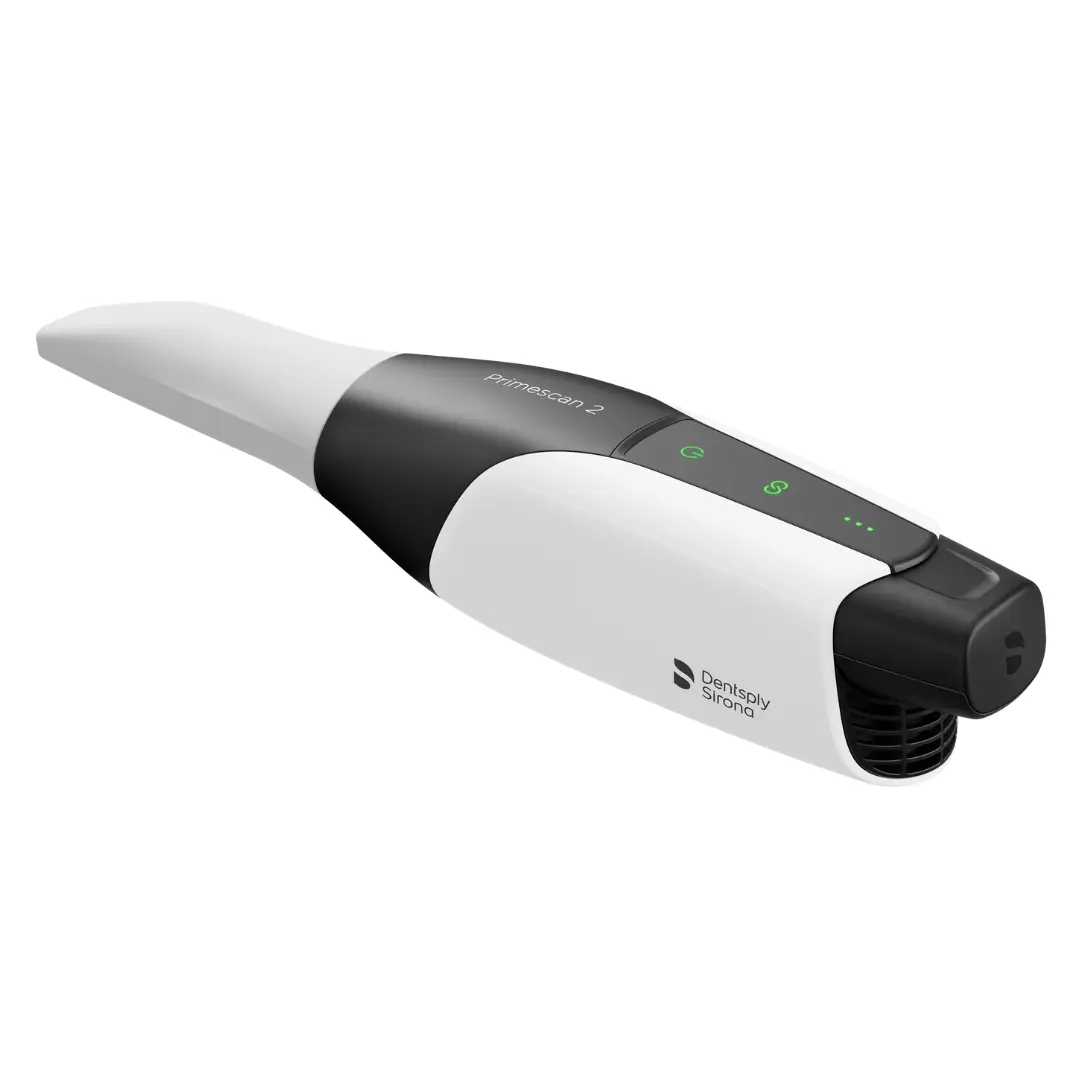
The Primescan 2 represents a giant leap in intraoral scanning technology. Released on September 5, 2024, this cloud-native scanner marks Dentsply Sirona's bold move toward browser-based digital dentistry. Unlike every other scanner on the market, Primescan 2 does not rely on a local computer to process scans – everything happens in the cloud through DS Core, accessed via a standard web browser.
This comprehensive guide examines every aspect of the Primescan 2, from its revolutionary cloud architecture to practical troubleshooting tips. Whether you are considering a purchase, upgrading from a previous model, or looking to maximize your investment, this article provides the insights you need.
TL;DR
Primescan 2 is the first cloud-native intraoral scanner, processing every scan through DS Core in a web browser with no local computer required.
It delivers sub-60-second full-arch scans, strong AI stitching, and built-in caries detection (405nm fluorescence + 850nm NIR), but demands a constant 50+ Mbps internet connection to work at all.
At 542g, it's the heaviest wireless scanner on the market, and its $24,995 price excludes mandatory DS Core subscriptions, $3.50/scan sleeves, and $200 spare batteries.
Buy it if you run reliable high-speed internet and live in the Dentsply Sirona ecosystem; skip it if you need offline scanning, light ergonomics, or low ongoing costs.
Why Primescan 2 Is A Big Deal
The Primescan 2 introduces a fundamentally new approach to digital impression technology that distinguishes it from all previous intraoral scanners. According to Dentsply Sirona's official announcement, the scanner represents the first cloud-native intraoral scanning solution available to dental professionals.
The first time you use Primescan 2, it feels genuinely futuristic. Scan data is streamed live, processed online, and stored centrally. When it works well, the experience reveals how digital dentistry is moving into a new phase. This transformation goes beyond incremental improvements, representing a complete rethinking of how intraoral scanners operate.
The scanner operates entirely through DS Core, Dentsply Sirona's cloud platform that has been in development for years. According to the Institute of Digital Dentistry's review, you can access DS Core from any browser on any device, including PC, Mac, laptop, tablet, phone, or even VR goggles. This hardware independence means practices can eliminate the cost of dedicated scanning computers, potentially saving $2,000–$3,000 compared with systems requiring specialized hardware.
Primescan Evolution: Complete Comparison Table
Understanding the evolution of Dentsply Sirona's intraoral scanners helps contextualize where Primescan 2 fits in the lineup. Each generation has built upon its predecessor while introducing distinct capabilities and trade-offs that matter for different clinical applications.
The following table compares all three generations across key specifications:
Specification | CEREC Omnicam | CEREC Primescan (PS1) | Primescan 2 |
Release year | 2012 | 2019 | 2024 |
Connectivity | Wired only | Wired only | Wireless (cloud-native) |
Weight | ~320g | ~450g | 542g (1.2 lbs) |
Dimensions (L×W×D) | Slim profile | Large form factor | 291×58×50.5mm |
Field of view | Narrow | Large (16×16mm) | Large (16×16mm) |
Full-arch scan time | ~3–5 minutes | <60 seconds | <60 seconds |
Internal heater | No | Yes | Yes + active cooling |
3 detection | No | No | Yes (fluorescence + NIR) |
Processing location | Local (cart) | Local (cart/laptop) | Cloud (DS Core) |
Software platform | CEREC SW | CEREC SW/Connect SW | DS Core (browser) |
Configuration options | Cart only | Cart or Connect (laptop) | Standalone + optional cart |
Scanner tips | Autoclavable metal | Autoclavable metal | Single-use + metal option |
Monochrome mode | Yes | Yes | No |
Internet required | No | No | Yes (mandatory) |
Base price (USD) | ~$15,000–20,000 | ~$40,000–51,000 | $24,995 |
Best for | Budget CEREC entry | Performance-focused | Cloud-first practices |
Key Advantages Of Primescan 2
Primescan 2 offers several groundbreaking advantages that set it apart from competitors and previous Dentsply Sirona models. These benefits span workflow efficiency, diagnostic capabilities, and long-term value for practices embracing cloud-based dentistry.
Cloud-Native Architecture
The cloud-native design represents the most significant architectural change in intraoral scanning since the introduction of digital impressions. According to Dental Products Report, this approach enables entirely new workflows that were previously impossible with traditional scanners.
Hardware independence allows operation on any device with a web browser, eliminating the need for dedicated scanning computers
Automatic software updates ensure DS Core always runs the latest version without manual installations
Universal access enables scans to be viewed, reviewed, and shared from anywhere with internet access
Reduced IT burden eliminates local server maintenance, backup management, and software compatibility issues
Multi-location flexibility makes it ideal for DSOs, traveling clinicians, and collaborative treatment planning
Wireless Freedom
The wireless capability of Primescan 2 extends beyond simple cord elimination. The scanner's mobility fundamentally changes how practices can integrate digital impressions into their workflows across multiple operatories and clinical settings.
Complete mobility within the operatory without cable management concerns
Portable scanning for hospital visits, partner practices, or laboratory consultations
Easy delegation allows the scanner to be handed off between team members instantly
Immediate availability for the next patient once the scan is complete
Integrated Caries Detection
Primescan 2 marks the first time Dentsply Sirona has shipped a flagship scanner with built-in diagnostic imaging capabilities. According to the Institute of Digital Dentistry's comprehensive review, this addition positions the scanner as a multipurpose diagnostic tool rather than a pure impression device.
Surface caries fluorescence using a 405nm light source provides detection capabilities similar to TRIOS 5
Near-infrared (NIR) imaging at 850nm enables approximal caries detection comparable to iTero NIRI
High-resolution intraoral camera functionality with automatic cloud storage
Radiation-free complement to bitewing radiography for certain lesion types
Scanning Performance
The optical engine in Primescan 2 builds upon the proven technology of its predecessor while introducing refinements that enhance clinical efficiency. The scanner maintains the speed and accuracy that made Primescan 1 a reference standard for many laboratories and clinicians.
Industry-leading stitching AI delivers a very low incidence of double images
Full-arch scans can be completed in under 60 seconds
Large field of view enables rapid coverage with fewer passes
Narrower scanner tip design improves posterior access
Photo-realistic scan texture enhances patient communication
Ecosystem Integration
Primescan 2 connects seamlessly with existing Dentsply Sirona equipment and workflows while also offering compatibility with third-party systems. This integration flexibility supports practices at various stages of digital adoption.
Seamless connection to existing CEREC systems (version 5.3+) for chairside milling
Canvas app provides patient communication and case collaboration tools
SureSmile integration enables orthodontic treatment simulation
Native STL, PLY, and exocad-compatible file exports
3Shape TRIOS integration allows scans to be sent directly to DS Core
DS X-ray integration provides unified imaging management
Limitations And Considerations
Despite its innovations, Primescan 2 has notable limitations that practices must carefully evaluate before purchasing. Understanding these trade-offs helps ensure the scanner aligns with your clinical needs and infrastructure capabilities.
Internet Dependency
The cloud-native architecture creates an absolute dependency on internet connectivity. According to Dentsply Sirona's technical specifications, the scanner requires a minimum of 50 Mbps upload and download speeds for optimal performance.
Requires an active internet connection to function, with no offline mode available
Network latency directly impacts scanning performance and tracking stability
Unsuitable for practices in areas with unreliable internet or frequent outages
May require network infrastructure upgrades, including additional access points and bandwidth optimization
Size And Ergonomics
The physical dimensions of Primescan 2 represent a deliberate trade-off between performance and portability. As noted in the Institute of Digital Dentistry comparison, the scanner is currently the heaviest wireless option on the market.
Heaviest wireless scanner on the market at 542 grams (1.2 pounds)
Almost 100 grams heavier than Primescan 1, which was already considered bulky
Competing scanners weigh 230–280 grams, roughly half the Primescan 2's weight
Extended scanning sessions may cause hand and wrist fatigue
Control And Usability Issues
The minimalist control interface introduces a learning curve for clinicians accustomed to traditional scanner buttons and controls. Some design choices prioritize aesthetics over practical usability in clinical settings.
No dedicated physical scan activation button on the scanner
Tap-to-scan gesture system lacks consistency and requires firmer taps than expected
No monochrome viewing mode available, as color textures cannot be disabled
Scanner does not consistently enter sleep mode when idle, causing unnecessary battery drain
Soft-tissue filtering is less aggressive than competitors, requiring a better retraction technique
Battery And Power Management
Battery life and management require careful attention in busy clinical environments. Practices must develop workflows around battery rotation to maintain uninterrupted scanning capability throughout the day.
Single battery supports approximately 4–5 treatment scans only
Busy practices may require multiple battery changes per day
The scanner cradle does not charge batteries, requiring a separate charging station
Additional batteries cost $200 USD each
Ongoing Costs
The total cost of ownership extends beyond the initial purchase price. According to Henry Schein's product information, practices must factor in subscriptions, consumables, and service plans when calculating their investment.
Mandatory DS Core subscription required to operate ($19.99–$200+/month depending on storage)
Single-use sleeves cost approximately $3.50 per patient ($105 for 30 sleeves)
DS Core Care service plan recommended at $175/month (free first year if activated within 90 days)
An edge device for slow internet environments adds additional hardware cost
Wired connection kit sold separately if wireless proves unreliable
Software Limitations
The DS Core ecosystem, while modern and intuitive, currently offers fewer applications and features than some competing platforms. These gaps may be addressed through future cloud updates, but currently represent limitations for certain workflows.
DS Core app library is smaller than competing ecosystems
No native model builder or full smile design application is currently available
Limited advanced editing tools compared to desktop-based platforms
Cannot add additional scan windows after the treatment path is selected
No dedicated denture or full-arch implant workflows are available yet
SureSmile simulator requires separate account registration with associated fees
AI Features And Intelligent Processing
Artificial intelligence plays a central role in Primescan 2's performance and represents a key differentiator in its cloud-native architecture. Research published in the Journal of Dental Research has demonstrated that AI can significantly enhance diagnostic accuracy in dental applications, and Primescan 2 leverages multiple AI systems that work together to deliver clinical results.
AI-Powered Scan Stitching
The stitching AI in Primescan 2 ranks among the strongest in the industry. This advanced algorithm assembles thousands of individual images into cohesive 3D models with remarkable accuracy, resulting in a very low incidence of double images, a common problem that affects many competing scanners. The cloud-based nature of this processing means Dentsply Sirona can continuously improve the algorithm, with updates deployed globally to every Primescan 2 in the field simultaneously.
Intelligent Tracking Recovery
When tracking is lost during scanning, the AI-driven recovery system typically re-acquires position quickly without requiring a complete restart. The system can recover from brief interruptions in most cases, though occasionally the scan visualization may rotate or shift unexpectedly when orientation is lost. This intelligent recovery significantly reduces chair time compared to scanners that require manual realignment after tracking loss.
AI Caries Detection Capabilities
The caries detection system uses AI-enhanced imaging across multiple modalities. According to a systematic review published in PMC/National Library of Medicine, AI-assisted caries detection has demonstrated accuracy rates between 73.3% and 98.6% across various datasets, with convolutional neural networks (CNNs) showing particular promise for clinical applications.
The Primescan 2 employs three distinct imaging modes powered by intelligent processing:
White light photography: High-resolution intraoral camera captures detailed visual documentation, automatically stored in the cloud and accessible through DS Core for patient communication and longitudinal monitoring
Fluorescence imaging (405nm): Demineralized enamel and bacterial by-products alter fluorescence signals, rendered as contrast areas commonly appearing as red zones against a green background, with AI processing highlighting potential lesions
Near-infrared imaging (850nm): NIR penetrates enamel more effectively than visible light, revealing subsurface anomalies with AI processing that helps identify early proximal lesions and enamel cracks
Soft-Tissue Recognition
The AI includes soft-tissue filtering to distinguish between tooth structure and surrounding tissues. However, this filtering is less aggressive than in some competing systems. The scanner tends to capture adjacent soft tissues such as cheeks and tongue more readily, which places greater emphasis on effective retraction during scanning. While rescanning typically removes captured soft tissue, this characteristic requires operators to maintain good retraction technique throughout the scanning process.
Future AI Development Potential
The cloud-native architecture positions Primescan 2 uniquely for future AI enhancements. Because all processing occurs on DS Core, Dentsply Sirona can deploy improvements to contrast enhancement, automated lesion detection, AI-assisted triage, and predictive diagnostics without requiring hardware changes. This means every Primescan 2 in the world can immediately benefit from new AI capabilities as they are developed. As research in dental AI continues to advance, DS Core updates could refine sensitivity and specificity over time, potentially making Primescan 2 an increasingly valuable diagnostic tool.
Common Primescan 2 Errors And Troubleshooting Guide
Cloud-based scanning introduces new troubleshooting considerations that differ from traditional wired systems. The following guide addresses the most common issues and their solutions, based on information from Dentsply Sirona's support resources and Patterson Dental technical documentation.
Connection And Network Issues
Network connectivity problems represent the most common category of issues with Primescan 2. Because the scanner depends entirely on cloud communication, resolving these problems quickly is essential for maintaining clinical workflow.
Problem: Scanner will not connect to DS Core (DS Core icon not green)
To solve the issue of Primescan 2 not connecting to DS Core:
Verify internet connectivity by testing on another device using the same network
Open the DS Core Link mobile app and re-pair via Bluetooth
Check that Wi-Fi credentials are correctly configured in the app
Ensure the scanner is within a strong Wi-Fi signal range
Restart the scanner by holding the power button for 3 seconds
If the problem persists, consider installing additional Wi-Fi access points in the operatory
Problem: Scanning lag or latency during acquisition
To improve the Primescan 2 efficiency and avoid latency:
Test upload and download speeds to confirm a minimum of 50 Mbps is available
Check for network congestion from other devices or applications
Move closer to the Wi-Fi access point or eliminate physical obstructions
Consider connecting directly to the network via cable (requires separate coupling hardware)
Implement the edge device for practices with slower upload speeds
Optimize bandwidth allocation by prioritizing scanner traffic on your network
Scanning Performance Issues
Performance problems during scanning often relate to either network conditions or scanning technique. Identifying the root cause helps determine whether the solution involves infrastructure changes or workflow adjustments.
Problem: Frequent tracking loss during scanning
To avoid tracking loss while running scans:
Check network latency, as even minimal lag disproportionately impacts tracking
Ensure adequate soft tissue retraction before scanning
Verify the scanning sleeve is clean and free of debris
Calibrate the scanner following the manufacturer's guidelines
Use the recommended scan path by starting at the molar occlusal surface and sweeping when passing centrals
For complex cases such as edentulous or full-arch scans, ensure optimal network conditions before starting
Problem: Scan visualization rotates or shifts unexpectedly
To avoid rotation or shifting in visualizations with Primescan 2:
This occurs when orientation is temporarily lost, so continue scanning to re-acquire position
The AI typically recovers quickly without needing to restart
If the problem persists, check network stability
Rescan the affected area to ensure complete capture
Battery And Power Issues
Power management problems can disrupt clinical workflow if not addressed promptly. According to Patterson Dental's battery troubleshooting guide, most battery issues can be resolved with basic troubleshooting steps.
Problem: Scanner will not power on
To solve power issues on Primescan 2 scanner:
Check battery charge level and ensure at least one fully charged battery is installed
Remove and reseat the battery
Try a different battery from the charging station
Hold the power button for a full 3 seconds
If issues persist, contact Dentsply Sirona support at 1-800-475-5036
Problem: Batteries are draining too quickly
To solve energy issues:
Power off the scanner between patients because it may not consistently enter sleep mode
Establish a battery rotation workflow with your team
Keep spare batteries on the charging station at all times
Consider purchasing additional batteries ($200 USD each) for high-volume practices
Expect approximately 4–5 scans per battery charge
Calibration And Quality Issues
Regular calibration maintains scan accuracy over time. Quality issues often indicate the need for recalibration or cleaning of the optical system.
Problem: Scan accuracy seems degraded
To improve the Primescan 2 scanner's accuracy:
Perform calibration using the included calibration unit
Ensure the metal sleeve is used for calibration, as disposable sleeves cannot be used for this purpose
Verify optics are clean before calibration
Maintain a stable network connection during calibration
Follow the manufacturer's recommendation for the monthly calibration schedule
Log calibration events for traceability and troubleshooting
When To Contact Support
Contact Dentsply Sirona PTC CEREC Support Team at 1-800-475-5036 if issues persist after troubleshooting steps, you receive encoder errors during Dr. Primescan diagnostics, hardware appears physically damaged, or you experience repeated scanning failures despite optimal network conditions. DS Core Care subscribers have access to real-time remote troubleshooting and express replacement services.
Primescan 2 Scan Speed And Performance
Scanning speed has always been one of the defining strengths of the Primescan platform, and Primescan 2 continues that tradition while introducing the complexity of cloud-based processing. Understanding how network conditions affect performance helps practices optimize their scanning workflows.
In terms of pure capture performance, the scanner operates at a level comparable to Primescan 1, which remains one of the fastest and most accurate intraoral scanners currently available. From a hardware standpoint, this is expected because the scanning engine itself has not been fundamentally redesigned. The core optical technology remains the same, with the primary innovation being the wireless, cloud-based processing workflow.
Under optimal network conditions, the cloud processing approach works remarkably well. The live scan view responds quickly, tracking is stable, and the overall experience closely mirrors that of a traditional wired scanner. A full-arch scan can be completed in under 60 seconds while delivering excellent accuracy. The large scanning field of view (16×16mm) enables rapid coverage of arches and reduces the need for excessive rescanning. Processing times typically range from 20 to 60 seconds, depending on dataset size.
However, cloud-based performance introduces a new dependency on network reliability. Lag, even when minimal, has a disproportionate impact during intraoral scanning. A slight delay between scanner movement and visual feedback can disrupt scanning flow, increase the likelihood of tracking loss, and slow down longer scan sequences. In more complex scans, such as edentulous cases or full-arch implant workflows, performance becomes more sensitive to connectivity because these require longer continuous capture sequences.
Size And Ergonomics
Primescan 2 stands out immediately in the intraoral scanner market due to its physical presence. The scanner's dimensions and weight represent deliberate design choices that prioritize performance and wireless capability over compact form factor.
At 542 grams (1.2 pounds), the scanner is currently the heaviest wireless option in its class, almost 100 grams heavier than its predecessor, which already had a reputation for being relatively large. Many competing scanners weigh roughly half as much, with some of the latest designs falling in the 230–280 gram range. This design choice reflects a clear prioritization of scanning performance and system stability, as the Primescan 2 is essentially a Primescan 1 adapted for a fully wireless, cloud-based workflow, requiring additional internal components, including batteries, active cooling, wireless hardware, and additional sensors.
Build quality is exceptional, with tight tolerances, seamless panel joins, and a solid premium finish. The scanner tip has been redesigned with a narrower profile than Primescan 1, improving access to posterior teeth and interproximal spaces. This narrower distal end reduces awkward angulation during distal molar capture while maintaining the same optical coverage. For practices performing many posterior or full-arch cases, this change materially enhances intraoral access and clinical efficiency.
Scanner Tips And Calibration
Primescan 2 ships with single-use scanning sleeves rather than relying solely on autoclavable tips, a departure from previous Dentsply Sirona norms. This approach offers both advantages and cost considerations that practices must evaluate based on their clinical volume and workflow preferences.
Disposable sleeves arrive sterile and free of micro-abrasions, ensuring consistent optical clarity from one patient to the next. A typical retail pack of 30 sleeves is priced around $105 USD, equating to approximately $3.50 per scan. A metal tip option is available separately for practices preferring a feel closer to legacy Primescan and Omnicam designs. While not autoclavable, the metal tip lowers per-case consumable expense. Selection should factor in sterilization capacity, per-scan economics, clinic sustainability goals, and local infection control regulations.
Calibration remains essential to preserve accuracy. The system includes a calibration unit, with manufacturer guidance typically recommending monthly calibration. Best practice includes a pre-calibration checklist (clean optics, stable network), execution of the vendor-specified routine, and a post-calibration validation scan. Important: Use the metal sleeve for calibration because disposable sleeves cannot be used for this purpose.
DS Core Platform And Software Ecosystem
DS Core represents a clear departure from traditional dental scanning software. Rather than operating on a dedicated workstation, it runs entirely within a web browser with a modern, simplified interface that reflects Dentsply Sirona's vision for the future of digital dentistry.
After logging in, clinicians can create or access patient records and begin scanning immediately. The user interface has been redesigned with clear separation between clinical tasks, patient data, and production workflows. The platform offers two primary scanning pathways: Status Scan for check-ups and baseline records, and Treatment Scan for restorative procedures. Status scans can later be reused as pre-operative data, meaning when a treatment scan is initiated at a future visit, the software can reference and incorporate earlier scans stored in the cloud.
Treatment Scan workflows branch into restoration, aligner, implant, and splint categories, each generating predefined scan windows tailored to the chosen indication. Post-processing options include SureSmile Simulator, Canvas communication app, direct transfer to inLab CAD or CEREC Chairside software, secure link sharing, and file exports in STL, PLY, and exocad-compatible formats. The Canvas app serves as a flexible digital workspace for importing scans, photographs, and annotations into a single interactive environment for patient communication. DS Core's full potential will be realized when cloud-based CAD design becomes available, potentially creating a genuinely end-to-end digital ecosystem.
Cost Analysis And Total Ownership
At $24,995 USD, Primescan 2 is positioned at the upper echelon of the intraoral scanner market, though slightly below competitors like TRIOS 5 (approximately $26,000) and iTero Lumina (approximately $30,000). Understanding the total cost of ownership helps practices make informed purchasing decisions.
The cloud-native design eliminates the need for specialized hardware, potentially saving $2,000–$3,000 compared with systems requiring dedicated computers. However, ongoing costs for subscriptions, consumables, and service plans must be factored into the total investment calculation.
Item | Cost (USD) |
Primescan 2 base price | $24,995 |
DS Core subscription (monthly) | $19.99–$200+ |
Single-use sleeves (30-pack) | $105 (~$3.50/scan) |
Additional batteries (each) | $200 |
DS Core Care (monthly) | $175 (free 1st year*) |
Optional cart | Sold separately |
Wired connection kit | Sold separately |
Edge device (if needed) | Additional cost |
*Free first year if activated within 90 days of installation.
Competitive Landscape: Primescan 2 Vs. Market Leaders
Understanding how Primescan 2 compares to other leading intraoral scanners helps practices make informed purchasing decisions. According to the Institute of Digital Dentistry's scanner comparison, each scanner offers distinct advantages for different clinical applications and practice profiles.
Feature | Primescan 2 | TRIOS 5 | iTero Lumina | Medit i900 |
Price (USD) | $24,995 | ~$26,000 | ~$30,000 | ~$18,000 |
Connectivity | Cloud-native | Wireless | Wireless | Wireless |
Weight | 542g | ~280g | ~350g | ~245g |
Caries detection | Fluorescence + NIR | Fluorescence | NIRI | No |
Monochrome mode | No | Yes | Yes | Yes |
Internet required | Yes (mandatory) | No | No | No |
Best for | Cloud-first DSOs | General practice | Orthodontics | Budget-conscious |
Bottom Line
Primescan 2 represents a substantial advancement in intraoral scanning technology through a fundamental transformation of how scanners operate rather than incremental improvements. The cloud-native architecture positions it as a potential disruptor in the premium digital dentistry market, offering capabilities previously unavailable in intraoral scanners.
Primescan 2 is ideal for practices that:
Have reliable, high-speed internet (50+ Mbps) and robust Wi-Fi infrastructure
Value hardware independence and the ability to scan from any device
Operate multiple locations or have traveling clinicians
Want integrated caries detection capabilities
Are already invested in or planning to invest in the Dentsply Sirona ecosystem
Prefer automatic software updates and cloud-based data management
Primescan 2 may not be suitable for practices that:
Have unreliable internet connectivity or frequent outages
Prioritize lightweight, ergonomic handheld devices
Require offline scanning capability
Prefer monochrome scan viewing for margin assessment
Want to minimize ongoing subscription costs
Need advanced CAD/design tools (currently limited in DS Core)
The release of Primescan 2 signals a shift toward flexible, interconnected, and future-ready dental technology. As cloud-native dentistry continues to expand, this scanner establishes a foundation for the next generation of workflows, diagnostics, and patient care. For practices ready to embrace cloud-based scanning with robust network infrastructure, Primescan 2 represents a compelling investment in the future of digital dentistry.
Looking for a wireless alternative with strong AI-driven scan processing? See our complete Medit i900 scanner review for a side-by-side perspective on price, accuracy, and clinical workflow.
Verdict
<p>Primescan 2 isn’t built for everyone. And that’s intentional. For practices already invested in CEREC, DS Core, and the broader Dentsply Sirona ecosystem, it’s a powerful, future-ready upgrade. With a stable internet connection, the experience genuinely feels next-gen.</p><p>That said, clinics prioritizing rock-solid reliability, lighter ergonomics, or offline security may still find a wired scanner the safer option—for now. Primescan 2 is more than a scanner; it’s a statement. Whether it becomes the new standard will depend on how ready dentistry is to embrace a fully cloud-driven workflow.</p>
Frequently Asked Questions
What internet speed do I need to use Primescan 2 effectively?
Dentsply Sirona recommends a minimum of 50 Mbps for both upload and download speeds. Upload speed is particularly critical because scan data must be transmitted continuously during acquisition. Practices that meet or exceed these requirements are far more likely to experience consistent performance. Strong Wi-Fi signal coverage throughout the operatory is equally important, as inadequate access point placement, interference, or network congestion can lead to intermittent lag or tracking loss.
Can I use Primescan 2 without an internet connection?
No, Primescan 2 requires an active internet connection to function. There is no offline mode available. If connectivity is lost entirely, scanning is not possible. This makes the scanner unsuitable for practices operating in areas with unreliable internet access or frequent outages. For such environments, a wired intraoral scanner remains the more dependable option. Dentsply Sirona does offer an edge device that can help practices with slower connections by processing data locally before uploading, but an internet connection is still required.
How does Primescan 2 compare in weight to other wireless scanners?
At 542 grams (1.2 pounds), Primescan 2 is the heaviest wireless scanner currently available. This is almost 100 grams heavier than Primescan 1. Many competing scanners weigh roughly half as much, with some of the latest designs falling in the 230–280 gram range. This weight reflects the integration of batteries, active cooling, wireless hardware, and additional sensors required for cloud-native operation. While build quality is exceptional, extended scanning sessions may cause hand and wrist fatigue for some operators.
What ongoing costs should I expect beyond the purchase price?
Beyond the $24,995 base price, practices should budget for a mandatory DS Core subscription ($19.99–$200+ monthly depending on storage needs), single-use sleeves at approximately $3.50 per patient, and potentially additional batteries at $200 each. The optional DS Core Care service plan costs $175 per month but is free for the first year if activated within 90 days of installation. Practices with poor connectivity may also need to invest in network infrastructure upgrades or the optional edge device.
Can I use Primescan 2 with my existing CEREC system?
Yes, Primescan 2 integrates with existing CEREC systems through DS Core. With the CEREC software update to version 5.3 or above, scans captured on Primescan 2 can be transferred directly from the cloud to your CEREC unit for design and milling. The process involves scanning with Primescan 2, then accessing your CEREC chairside software, where the scans will appear after downloading from the cloud. Design workflows remain local for now, though the infrastructure suggests future cloud-based CAD capabilities are being developed.