Rating: 4/5
Medit i700 Scanner Review for Dentists
Before diving into specs and features, it’s important to understand why the Medit i700 matters. This scanner didn’t just arrive as another incremental update – it arrived with the...
Reviewed by Marcus Hale
Pros
- Excellent scanning speed and clinical accuracy.
- Lightweight, ergonomic design.
- Powerful free software and apps.
- Open architecture with broad lab compatibility.
- No mandatory subscription fees.
Cons
- No native CAD/CAM design software.
- Not compatible with Invisalign.
- Some apps still feel early-stage.
- Requires a strong computer setup.
Before diving into specs and features, it’s important to understand why the Medit i700 matters. This scanner didn’t just arrive as another incremental update – it arrived with the intention of redefining what dentists should expect for the price.
Why the Medit i700 Changed the Conversation
Medit originally entered dentistry from industrial 3D scanning, and that background shows. When the i500 launched, it challenged the idea that high-quality intraoral scanning had to be expensive or locked behind subscriptions. The i700 builds on that philosophy but pushes performance, ergonomics, and software much further.
Rather than positioning itself as a “budget” option, the i700 aims to be a serious clinical tool that just happens to cost significantly less than most premium scanners. And for many practices, that distinction matters.
Speed is often the first thing clinicians notice when switching scanners, and it’s where the i700 immediately impresses.
Scanning Speed and Real-World Performance
In daily clinical use, the Medit i700 feels fast – genuinely fast. Full-arch scans routinely fall under 40 seconds, and experienced users can push that even lower with clean scanning technique. This places the i700 comfortably alongside far more expensive scanners from TRIOS, CEREC, and iTero.
The scanner’s field of view is slightly smaller than some competitors, which gives it a different scanning “feel.” You move a bit more, especially across anterior teeth, but the data capture remains smooth and predictable. The software initially displays a grainier image that refines itself during post-processing, resulting in sharp, high-definition color scans.
What stands out most is the AI. The scanner quickly reorients itself if tracking is lost, aligns bite scans reliably, and removes unwanted artifacts such as cheeks, tongue, or gloves. You can even fine-tune AI sensitivity – a level of control rarely seen at this price point.
Hardware matters more than many dentists expect, especially once scanning becomes routine rather than occasional.
Ergonomics, Size, and Everyday Handling
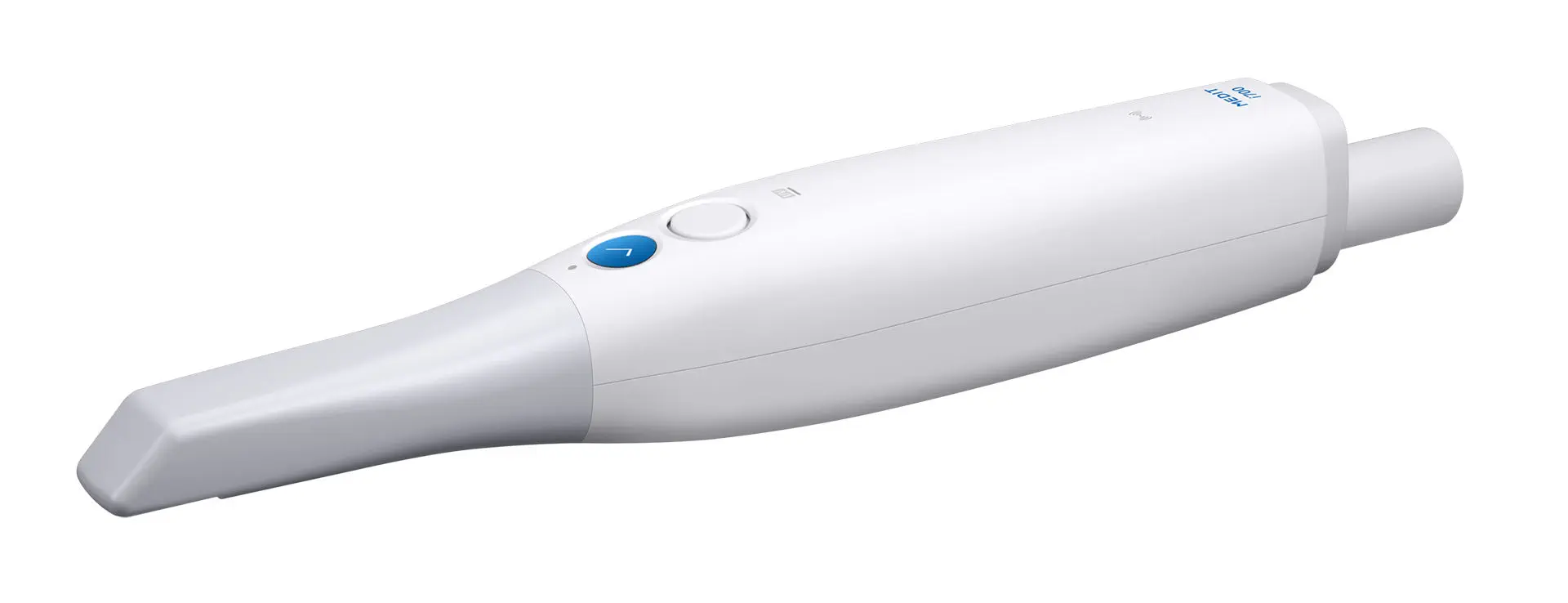
The Medit i700 is one of the smallest and lightest intraoral scanners currently available. At roughly 245 grams, it feels noticeably lighter than many competing scanners, and that difference becomes obvious during longer scanning sessions.
The scanner is designed to be held like a pen, with buttons positioned naturally under the fingers. Compared to the previous i500, the grip is slimmer and more comfortable, solving one of the few ergonomic complaints users previously had.
A major quality-of-life upgrade is power delivery. If your laptop supports sufficient USB-C power output, the i700 can run without a separate power hub – something almost unheard of among USB scanners. For practices that move scanners between rooms, this alone is a big win.
The scanner head is reversible, making posterior access easier, and the redesigned autoclavable tips now last significantly longer than previous generations. That reduces ongoing consumable costs and improves infection control workflows.
Long scans are only comfortable if fogging and heat are managed properly.
Inbuilt Fan and Hygiene Features
Like modern premium scanners, the i700 includes an internal fan that prevents fogging of the scan tip. In practice, this allows uninterrupted scanning even during full-arch or edentulous cases. There is a brief warm-up period at startup, but it can be skipped if needed.
Medit also added a UV-C internal LED intended to reduce microbial contamination inside the scanner body. While it’s a thoughtful idea, the real-world impact remains difficult to quantify, as internal contamination has not traditionally been a major clinical issue. Still, it’s a unique feature and shows Medit’s willingness to experiment.
Speed and comfort are meaningless if accuracy isn’t there – especially for full-arch work.
Full-Arch Scanning and Clinical Accuracy
The Medit i700 handles full-arch scans confidently. Dentate arches, edentulous spans, quadrant cases, and implant scans are all well within its capabilities. With stable AI tracking and consistent data capture, the scanner performs reliably even in less-than-ideal conditions.
Medit reports full-arch accuracy figures around 11 microns. While independent research is still catching up to the latest generation, the i700 builds on the proven performance of the i500, which has already demonstrated clinical accuracy suitable for most restorative indications.
For complete-arch implant cases, photogrammetry remains the gold standard. But for crown-and-bridge, orthodontics, and general prosthodontics, the i700 is more than accurate enough for daily practice.
Technology is only as good as the software running it.
Ease of Use and Learning Curve
Medit Link is the software backbone of the i700, and it plays a huge role in the scanner’s appeal. The workflow is intuitive and familiar: enter patient details, scan the preparation, scan the opposing arch, capture the bite, and export.
What makes Medit stand out is how much guidance the software provides. On-screen prompts, animations, and pop-ups help new users avoid mistakes. There’s even a dedicated practice model with a QR code that activates a guided tutorial mode – a surprisingly effective way to train new staff.
Editing tools are plentiful. You can clean scans, mark margins for labs, analyze preparations, and preview results without leaving the platform. While Medit Link doesn’t design restorations itself, it prepares data cleanly for third-party CAD software.
One of the biggest selling points of the i700 is how open it is.
Open Architecture and File Export Options
The Medit i700 is a true open scanner. It exports STL, OBJ, and PLY files, making it compatible with most labs and CAD systems. STL remains the most widely used format, though it does not preserve color data. OBJ and PLY retain full color, which some labs and software increasingly support.
Medit Link operates primarily as a cloud-based system, allowing access to scans from anywhere with an internet connection. Offline scanning is possible, but periodic online access is required for updates and synchronization.
One important limitation: Align Technology does not accept Medit scans for Invisalign. Practices heavily invested in Invisalign workflows should factor this in.
Medit’s biggest surprise isn’t the scanner – it’s the software ecosystem.
Medit Link Apps: More Than Just Scanning
Medit offers a growing suite of applications inside Medit Link, all included without additional subscription fees. These apps are not gimmicks – they’re genuinely useful tools for communication and planning.
Medit Compare
This app overlays scans taken at different time points, allowing clinicians to visualize wear, orthodontic movement, or disease progression. It’s valuable both clinically and for patient education.
Orthodontic Simulation
Medit’s orthodontic simulator creates animated tooth movement previews that are easy to present chairside. It sits nicely between fully automated systems like iTero and more complex planning software.
Smile Design
The Smile Design app allows clinicians to overlay cosmetic simulations onto patient photos. While the tooth textures are not as refined as some premium competitors, the workflow is fast, intuitive, and effective for patient motivation.
Model Builder
Model Builder is one of Medit’s strongest apps. With just a few clicks, you can generate printable digital models complete with bases, text, drain holes, and articulator pins – all without third-party software.
Crown Fit
Crown Fit is the most experimental app. It compares CAD crown data with scans of the prepared tooth and final restoration to visualize discrepancies. While interesting, it currently feels niche and limited in real-world application.
Price has always been Medit’s strongest weapon.
Cost, Ownership, and Ongoing Fees
The Medit i700 is priced significantly below most premium scanners, making it accessible to practices that previously hesitated to invest in digital impressions. There are no mandatory subscription fees, and software updates are included.
Medit provides a limited amount of free cloud storage, with paid options available if additional space is needed. Scanner tips are autoclavable with a much-improved lifespan compared to earlier Medit models, keeping per-scan costs low.
It’s worth noting that the scanner requires a capable computer. Underpowered laptops will struggle, so budgeting for proper hardware is essential.
Bottom Line
The Medit i700 delivers what many dentists actually want: fast, accurate scanning, excellent ergonomics, and genuinely useful software – without locking you into expensive ecosystems or ongoing subscriptions. It’s not trying to replace full chairside CAD/CAM systems, and it doesn’t need to.
Comparing options? See our Medit i600 review for a budget alternative, the Medit i900 review for the next step up, or browse the full Medit lineup.
Verdict
If your primary goal is high-quality digital impressions with flexibility, the Medit i700 is one of the smartest investments you can make. It delivers premium-level performance at a mid-market price and continues to improve through free software updates. For practices focused on same-day dentistry or heavily tied to Invisalign, other systems may make more sense. But for the vast majority of clinicians looking to enter or upgrade their digital workflow, the Medit i700 is easy to recommend – and hard to beat.
Frequently Asked Questions
How much does the Medit i700 cost?
The Medit i700 wired version typically retails between $17,000 and $19,000, with the wireless model around $21,000–$23,000. Unlike most competitors, Medit charges no annual subscription fee for its scanning software, which significantly lowers total cost of ownership over 3–5 years.
Is the Medit i700 good for full-arch scans?
Yes. The Medit i700 captures full-arch scans accurately in 30–60 seconds when proper scanning protocol is followed. It performs well for crowns, bridges, implants, and clear aligner cases, though very large edentulous spans still benefit from scan-bodies or anatomical reference points.
Does the Medit i700 require a subscription?
No. Medit Link, Medit Scan for Clinics, and the core CAD tools are included free with the scanner. Optional add-ons like Medit Apps (orthodontic simulation, smile design, etc.) may have a paid tier, but daily scanning workflow has no recurring software fee.
What is the difference between the Medit i700 and i900?
The i900 is Medit's flagship — lighter, faster, with improved color accuracy, AI margin detection, and a more ergonomic body. The i700 remains a strong value choice for practices that want full-arch scanning without the latest premium features.
Which labs accept Medit i700 scans?
Medit exports open STL, PLY, and OBJ files, which virtually all dental labs accept. Through Medit Link, scans can also be sent directly to a lab's inbox, integrated with Exocad, 3Shape Dental System, and most aligner platforms including SureSmile and Spark.