Rating: 4.6/5
A Complete Medit i900 Scanner Review
Digital impressions have transformed how dental professionals approach restorative, implant, and orthodontic workflows. The shift from traditional PVS impressions to intraoral...
Reviewed by Marcus Hale
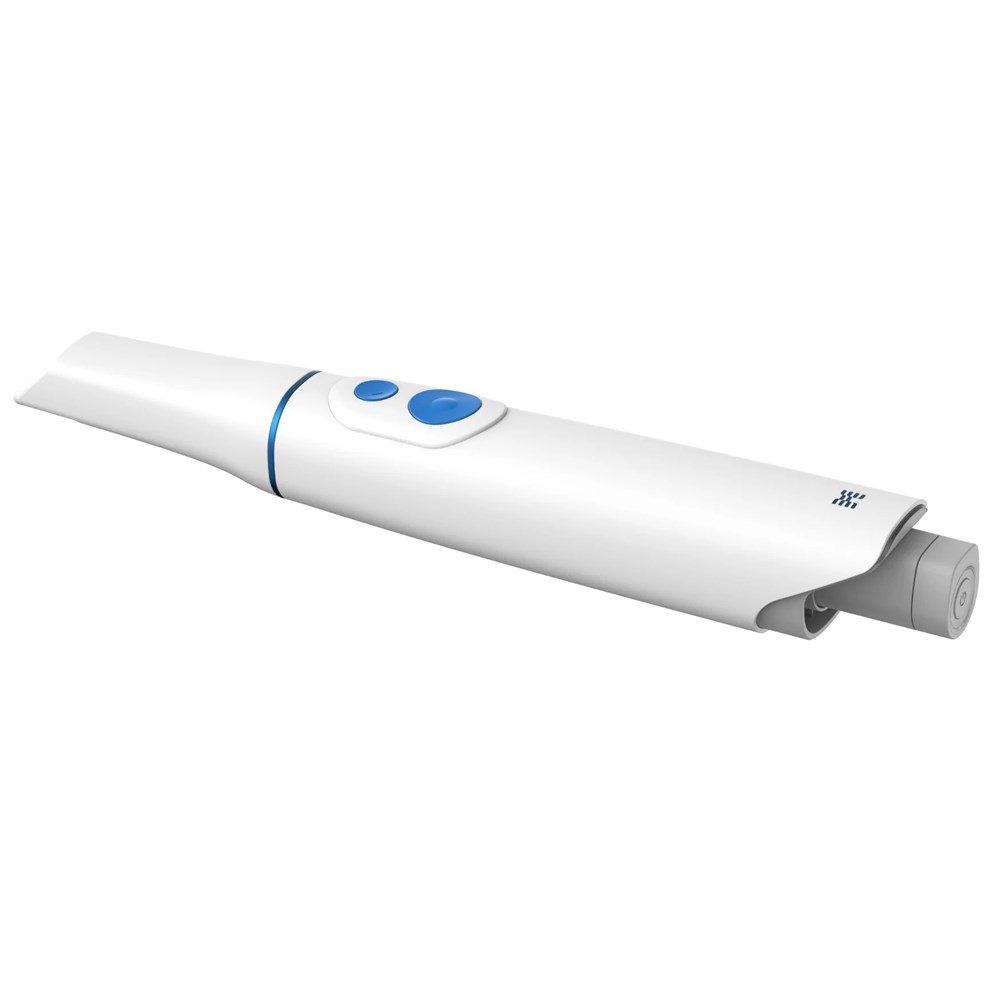
Pros
- Lightest mainstream scanner at 165 grams, reducing hand and wrist fatigue over long scanning sessions
- Fully open architecture with STL, PLY, and OBJ export, no restrictions on lab or software partners
- No subscription fees for core Medit Link software, apps, or updates, lowering the total cost of ownership
- Wide field of view captures more data per pass, speeding up full-arch scans
- 10-bit true color engine produces lifelike scan visuals for patient communication and shade matching
- 3rd-generation optical engine handles reflective metal surfaces better than previous models
- Strong and growing software ecosystem with SmartX implant workflows, orthodontic tools, and app marketplace
- The i900 Classic variant addresses the touch control complaints with a reliable physical button
- i900 Mobility variant adds fully wireless, iPad-native scanning for room-to-room and off-site flexibility
- Competitive Medit scanner price after the 2025 price reduction, significantly undercutting comparable premium scanners
Cons
- Original i900 touch controls are frustrating in clinical use, especially with gloves (resolved in Classic)
- Wired connection only on the base/Classic model; wireless requires the separate i900 Mobility
- No built-in NIRI caries detection technology, unlike the iTero Element 5D+
- Software can lag on computers that only meet the minimum system requirements
- Optional add-on costs apply: ClinicCAD is separately licensed, and cloud storage above the free 2 GB tier is paid
- Scanner tips are sold separately and represent an ongoing consumable cost
- Relatively new in the premium segment, so long-term reliability data is still developing compared to established competitors
Digital impressions have transformed how dental professionals approach restorative, implant, and orthodontic workflows. The shift from traditional PVS impressions to intraoral scanning technology continues to accelerate, and choosing the right scanner has become one of the most consequential technology decisions a practice can make. With several premium options available from 3Shape, Align Technology, Dentsply Sirona, and others, the Medit i900 has entered the conversation as a serious contender in the premium scanner segment.
This Medit i900 review is written from a clinical perspective, covering everything from real-world scanning performance and accuracy to the Medit scanner price and total cost of ownership. Whether you are evaluating the Medit i900 as your first intraoral scanner or considering an upgrade from the i700 series, this article provides the practical insights you need. We also dedicate a substantial section to common problems dentists encounter with the Medit i900 and the step-by-step solutions that have proven effective in clinical practice.
The goal here is simple: give you an honest, balanced assessment so you can decide whether this Medit intraoral scanner belongs in your operatory.
TL;DR
Medit packs premium scanning into the lightest mainstream handpiece (165 g), 10-bit color, and a wide field of view — all on open architecture with zero subscription fees.
The 2025 price cut drops the scanner to roughly $18,999 (about $20,999 bundled with a laptop), undercutting TRIOS 5, iTero, and Primescan 2 by $5,000-plus.
The i900 Classic swaps the original’s glitchy touch controls for a physical button, making it the version most clinicians should buy; the i900 Mobility adds iPad-native wireless scanning.
It skips built-in NIRI caries detection and deep Invisalign integration, so iTero-and-aligner-heavy practices may still prefer a closed ecosystem.
Medit i900 Key Specifications and What’s New
Before diving into the clinical experience, it helps to understand what the Medit i900 brings to the table from a hardware standpoint. Medit launched the i900 in April 2024 as its new flagship, and the Institute of Digital Dentistry called it “Medit’s first venture into the premium-cost scanner segment.” The scanner has since been expanded with the i900 Classic variant (featuring a physical button interface) and the i900 Mobility, a fully wireless version that runs an iPad-native app called Medit Link Express.
Here is a quick look at the core Medit i900 specifications:
Specification | Medit i900 details |
|---|---|
Weight | 165 grams (lightest mainstream scanner) |
Width | 35 mm |
Field of View | Confirm against Medit’s current spec sheet — listings cite 22 x 20 mm (large tip) and 18 x 15 mm (standard tip) |
Scan Speed | Over 60 FPS with medium tip (fast mode) |
Scan Depth | 30 mm |
Color Depth | 10-bit true color (1.07 billion colors) |
Optical Engine | 3rd generation |
Connection | USB-C wired (Power Delivery); Wi-Fi 6E wireless on i900 Mobility |
Design | Unibody construction, seamless, no joints |
Interface | 360° TouchBand + touchpad (original) or physical button (Classic) |
Tip Sizes | Multiple sizes, autoclavable, sold separately |
Software | Medit Link (open platform, no subscription); latest version v3.4.10 |
File Export | STL, PLY, OBJ (fully open architecture) |
The most significant hardware upgrade over the Medit i700 is the combination of a dramatically wider field of view and a much lighter body. According to Medit’s official specifications, the i900 captures scan data at over 60 FPS in fast mode, and its 10-bit color engine recognizes over one billion colors compared to the 16.7 million colors captured by 8-bit scanners. The 3rd-generation optical engine also includes improved algorithms for scanning reflective metal surfaces with less distortion.
Medit introduced the i900 Classic in 2025, which replaces the capacitive touch controls with a traditional physical button. All internal hardware, optics, and scanning performance remain identical between the original i900 and the Classic. In 2025, Medit also released the i900 Mobility, which keeps the same optics and performance but goes fully wireless over Wi-Fi 6E and can be driven from an iPad through the new Medit Link Express app; it was named IOS of the Year at the 2025 iDD Awards.
Medit i900 Scanner Price: Cost Breakdown and Value Analysis
One of the first questions any practice owner asks is about the medit scanner price, and it is a fair question given how much scanners cost have varied across the market. The Medit i900 represents a premium-tier investment, but Medit’s pricing strategy has evolved considerably since the scanner’s initial launch.
When the i900 originally launched, the retail price was approximately $24,500 USD. However, Medit reduced the price significantly in 2025. The scanner-only Medit i900 price now starts at approximately $18,999 USD, with bundled packages (including a scanning laptop) available for around $20,999 USD, a roughly $5,000 reduction from launch. Promotional pricing has also been available – Medit ran a “Save $4,000” instant-savings offer on new i900 Classic and Mobility purchases between April 1 and June 30, 2026, and authorized distributors offer trade-in and loyalty pricing reaching up to $8,000 off MSRP through the end of 2026.
What makes the Medit scanner price particularly compelling is what is included. Unlike some competitors that charge recurring subscription fees, Medit operates on a no-subscription model for its core platform. The Medit Link software included apps, software updates, and open-architecture file exports that come at no additional ongoing cost. A few optional extras are paid: the ClinicCAD module is separately licensed, and cloud storage beyond the free 2 GB tier is billed (for example, a 10 TB plan runs about $9.99/month), but these are opt-in rather than mandatory. This is a meaningful differentiator when you consider that some competing platforms charge annual licensing fees that can add thousands to the total cost of ownership over a scanner’s lifespan.
To put the Medit i900 price in context among competing premium scanners:
Scanner | Approx. price tier | Subscription required? |
Medit i900 / Classic | $18,999 – $21,999 USD | No |
3Shape TRIOS 5 | $24,000+ USD | Yes (Connect license) |
iTero Element 5D+ | $25,000+ USD | Yes (monthly plan) |
Primescan 2 | $24,000+ USD | Yes (CEREC software) |
When calculating return on investment, consider that practices adopting intraoral scanners typically see reduced impression material costs, fewer remakes due to improved accuracy, faster lab turnaround with digital files, and increased case acceptance when patients view their scans in full color on screen. Most practices report recouping the medit scanner price within 12 to 18 months, depending on case volume.
Keep in mind that the medit scanner price varies by region and dealer. Always request quotes from authorized distributors, as promotional pricing, trade-in programs, and bundle options can significantly impact the final cost.
Hands-On Performance Review: Clinical Scanning Experience
Specifications on paper only tell part of the story. What matters most to dental professionals is how the Medit i900 performs chairside across a range of clinical scenarios. After extended testing across restorative, implant, and orthodontic workflows, several aspects of the scanning experience stand out.
Speed and acquisition. The larger field of view on the Medit i900 is immediately noticeable. Full-arch scans are noticeably faster compared to the i700 series because each pass captures more data. The scanner’s 60+ FPS frame rate in fast mode keeps the 3D model building smoothly on screen, reducing the likelihood of losing tracking during rapid movements. For single-unit crown preparations, the scan-to-completion time is typically under 30 seconds once you are comfortable with the scan path.
Accuracy and detail. Marginal detail capture is strong, with clear delineation of finish lines on well-prepared teeth. The 10-bit color engine produces remarkably lifelike tissue rendering, which is clinically useful for shade communication with labs and for patient education. The 3rd-generation optical engine handles reflective metal surfaces (amalgams, metal copings) considerably better than the previous generation, though heavily polished metal restorations can still require slower scanning speeds.
Ergonomics. At just 165 grams, the Medit i900 is noticeably lighter than virtually every competing scanner. For clinicians who scan multiple patients daily, the reduced hand fatigue is a genuine clinical benefit. The unibody design feels solid without adding bulk, and the compact handpiece makes posterior access more comfortable, especially for patients with limited opening.
Touch controls vs. Classic button. The original i900’s capacitive touch interface was its most polarizing feature. The touch panels "often lead to unintended inputs, particularly challenging when wearing gloves." The i900 Classic addresses this completely by replacing touch controls with a traditional physical button. If you are purchasing new, the Classic variant is the stronger recommendation for most clinicians.
Challenging scan scenarios. The i900 handles edentulous ridges and soft tissue scanning well, thanks to the wider field of view and improved depth of field (30 mm). Full-arch implant scans with scan bodies are accurate, and the recently introduced Medit SmartX workflow for All-on-X cases adds dedicated guided functionality for implant prosthetics. Bite registration capture is straightforward, with reliable auto-alignment in most cases.
Software Ecosystem: Medit Link, Medit Design, and the App Marketplace
One of the strongest aspects of the Medit i900, and arguably what sets this Medit intraoral scanner apart from much of the competition, is its software platform. Medit Link serves as the central hub for scanning, case management, file export, and integration with third-party workflows. The interface is clean, intuitive, and regularly updated. As of mid-2026, the latest version is Medit Link v3.4.10.
Medit Link operates on a fully open architecture, meaning scan data can be exported as STL, PLY, or OBJ files and sent to any compatible lab or CAD/CAM system. This open approach stands in sharp contrast to some competing ecosystems that restrict where scan data can be sent or require additional licensing for exports.
The Medit Apps marketplace offers a growing library of integrated tools, including orthodontic simulation, smile design, model builder, and the newer Medit SmartX module for guided implant workflows. All apps are accessible to Medit scanner owners at no extra charge, which again reflects Medit’s no-subscription philosophy.
Medit Design, the chairside CAD module, enables in-office restoration design for practices with milling capabilities. While it does not replace a full Exocad or 3Shape Dental System license for complex cases, it covers single-unit crowns, inlays, onlays, and temporary restorations competently.
A Reddit community sentiment analysis by Medit covering 3,800 discussions from r/Dentistry highlighted strong user recognition for software usability, workflow flexibility, and overall value, underscoring that Medit’s software platform is one of its greatest competitive advantages. In May 2026, Medit further signaled its long-term commitment to digital workflows by launching a dedicated orthodontics division and acquiring Progressive Orthodontics, integrating clinical education with its scanning ecosystem.
Common Medit i900 Problems Dentists Encounter and How to Solve Them
No scanner is perfect, and the Medit i900 is no exception. The following are the most commonly reported problems from clinicians using the i900 in daily practice, along with practical solutions that have proven effective. This section is designed to help both prospective buyers understand realistic expectations and current users troubleshoot their workflow.
Problem #1: Touch Control Sensitivity and Accidental Inputs (Original i900)
The most widely discussed Medit i900 problem relates to the original model’s capacitive touch controls. Independent reviewers found that the touch panels frequently triggered unintended inputs during scanning, especially while wearing gloves. Clinicians reported accidentally swiping when intending to double-tap, or activating features unintentionally during active scans.
To solve it, open Medit Link settings and disable specific touch gestures you do not use, limiting the touch interface to basic start/stop functionality. This significantly reduces accidental triggers. For those purchasing new, the i900 Classic eliminates this problem entirely with its physical button interface. The Classic variant maintains identical scanning performance and optics at a similar price point, making it the recommended choice for most practices.
Problem #2: Scan Stitching Errors and Misalignment on Full-Arch Scans
Some clinicians experience tracking loss or mesh misalignment when scanning full arches, particularly in areas with limited geometric reference points, such as edentulous ridges or flat palatal surfaces. The scanner may lose its position and produce visible stitching artifacts in the 3D model.
To solve it, follow a systematic scan path, starting on the occlusal surfaces, then sweeping to the buccal, and finally completing the lingual or palatal. Slow your scanning speed when transitioning between areas with different geometry. Ensure adequate retraction with cheek retractors so the scanner has consistent access. For edentulous areas, adding a small amount of reference material (such as orthodontic wax placed in strategic spots) can give the scanner geometric landmarks. Use the "rescan" feature in Medit Link to patch specific areas rather than restarting the entire scan.
Problem #3: Poor Margin Capture on Subgingival Preparations
Capturing clean, sharp margins on subgingival preparations can be challenging with any intraoral scanner, and the Medit i900 is no exception. Tissue impingement, moisture contamination, and sulcular bleeding can obscure the finish line.
To solve it, proper tissue management is the foundation. Place retraction cord (single or double cord technique) and apply a hemostatic agent before scanning. Use the smaller tip size for better sulcular access on deep subgingival margins. Scan the preparation first while tissue retraction and hemostasis are optimal, before scanning the rest of the arch. Dry the preparation thoroughly with air, and consider using the high-resolution scanning mode for the critical margin zone. If the margin is not captured cleanly on the first pass, use the targeted rescan feature to re-acquire just the preparation area.
Problem #4: Software Performance and Freezing During Large Scans
Some users report that Medit Link becomes sluggish or occasionally freezes during large scan files, particularly full-arch scans on computers that barely meet the minimum system requirements. For this, a dedicated scanning PC is recommended because background programs can affect scanning performance.
To solve it, ensure your computer meets or exceeds Medit’s recommended system requirements rather than just the minimum specifications. Use a dedicated PC for scanning and close all unnecessary background applications before starting. Update your GPU drivers regularly, as outdated graphics drivers are a common cause of scanning software instability. Keep Medit Link updated to the latest version, as Medit releases frequent performance improvements. Ensure you have ample SSD storage, as large scan files written to a slow or nearly full hard drive will degrade performance.
Problem #5: Scanning Reflective Metal Surfaces
While the Medit i900’s 3rd-generation optical engine improved metal scanning significantly, heavily polished metal restorations, gold crowns, and certain amalgam surfaces can still cause scanning artifacts or incomplete capture in some cases.
To solve it, reduce your scanning speed when passing over highly reflective surfaces. The i900’s updated algorithms handle most metal surfaces well at moderate scanning speeds. For extremely reflective restorations, a light application of scanning powder (such as VITA Powder Scan Spray) can reduce surface reflectivity. Position the scanner tip at a slight angle rather than directly perpendicular to the reflective surface. In most routine clinical situations involving amalgams and standard metal-ceramic restorations, the i900 manages without any additional intervention.
Problem #6: Tip Fogging During Scanning
The temperature difference between the scanner tip and the warm, humid oral environment can cause the tip to fog, resulting in degraded scan quality and the need to pause mid-scan.
To solve it, pre-warm the scanner tip before entering the mouth. You can do this by running a brief practice scan, holding the tip near the patient’s cheek for a few seconds, or placing the scanner on its heated cradle if available. Some clinicians apply a small amount of anti-fog solution designed for dental mirrors. Medit’s newer generation tips include improved anti-fog coatings, so confirm you are using the latest tip version. Keeping the operatory at a comfortable temperature (not excessively cold) also helps reduce the temperature differential.
Medit i900 vs. Competitors: How Does It Stack Up?
Understanding how the Medit i900 compares to other leading scanners helps put its strengths and limitations into perspective. Here is a practical comparison across the key factors most dental professionals prioritize.
Feature | Medit i900 | 3Shape TRIOS 5 | iTero Element 5D+ | Primescan 2 |
|---|---|---|---|---|
Price tier | Mid-premium | Premium | Premium | Premium |
Subscription | None | Required | Required | Required |
Weight | 165 g | 299 g | ~290 g | ~524 g |
Open system | Yes (fully open) | Partially | Limited | Limited |
Color depth | 10-bit | Not disclosed | Not disclosed | Not disclosed |
Wireless option | i900 Mobility | TRIOS 5 Wireless | No | No |
Where the Medit i900 wins is the combination of open architecture, no subscription fees, a significantly lower Medit scanner price than most premium competitors, and one of the lightest form factors on the market, making the i900 extremely competitive. The software ecosystem is mature and continuously improving.
However, there are features where competitors may have an edge. The iTero Element 5D+ offers NIRI (near-infrared imaging) caries detection technology, which the Medit i900 does not currently match. iTero also provides deep Invisalign integration for orthodontic-heavy practices. The 3Shape TRIOS 5 has a well-regarded shade matching system. Dentsply Sirona’s Primescan 2 integrates tightly with the CEREC chairside milling ecosystem.
Medit i900 vs. i700: Is the Upgrade Worth It?
For existing i700 users, the i900 offers a wider field of view (30% larger), a lighter handpiece, 10-bit color, and improved metal scanning. If your i700 is performing well and meeting your clinical needs, the upgrade is a nice-to-have rather than a necessity. If you are purchasing your first Medit scanner, the i900 Classic is the clear choice.
Who Should Buy the Medit i900 (and Who Shouldn’t)
Not every scanner is the right fit for every practice. Here is a straightforward assessment of where the Medit i900 excels and where other options might serve you better.
The Medit i900 is an excellent choice for:
Practices that value an open-system scanner with no subscription fees
Multi-disciplinary clinics handling restorative, orthodontic, and implant cases
Dentists who prioritize lightweight ergonomics for all-day scanning comfort
Budget-conscious buyers seeking premium performance at a lower total cost of ownership
Practices already invested in the Medit ecosystem, looking to upgrade from the i700
The Medit i900 may not be ideal for:
Practices heavily committed to the iTero/Invisalign workflow that rely on seamless integration
Clinicians who require built-in NIRI caries detection technology
Practices that prefer a completely turnkey, closed-system ecosystem with chairside milling (CEREC)
Bottom Line
The Medit i900 is a genuinely impressive intraoral scanner that successfully positions Medit as a contender in the premium scanner segment. Its combination of a featherlight 165-gram body, 10-bit color capture, a wide field of view, and Medit’s excellent no-subscription software platform makes it one of the most complete digital dentistry solutions available today.
The original touch control issue was a legitimate stumble, but Medit’s responsiveness in launching the i900 Classic with a physical button shows a company that listens to its clinical users. At its current medit scanner price of approximately $18,999 USD for the scanner only, the i900 Classic offers strong value compared to competing premium scanners that cost $24,000+ and require ongoing subscription fees.
For practices looking to invest in or upgrade their digital impression workflow and improve efficiency around restorative dentistry, the Medit i900 (specifically the Classic variant) earns a strong recommendation. It delivers premium scanning performance, an industry-leading software ecosystem, and a total cost of ownership that is difficult to beat at this level.
Verdict
<p>The Medit i900 Classic earns a strong recommendation for dental professionals seeking a premium intraoral scanner without the premium subscription burden. It scans fast, captures exceptional detail, and integrates into virtually any lab workflow thanks to its open architecture. The lightweight design reduces fatigue over long clinical days, and the Medit Link software ecosystem continues to mature with frequent updates and new features. The original touch interface was a misstep, but the Classic variant solves that completely.</p>
Frequently Asked Questions
What is the medit scanner price in 2026?
The Medit i900 scanner-only price starts at approximately $18,999 USD, with bundled packages including a laptop available around $20,999 USD. The i900 Classic is priced similarly. Pricing varies by region and dealer, so requesting a quote from an authorized Medit distributor is recommended for the most current pricing.
How accurate is the medit i900 for full-arch implant scanning?
The Medit i900 delivers strong accuracy for full-arch implant workflows. The wider field of view and 3rd-generation optical engine produce reliable scan data for implant-supported restorations. The Medit SmartX module adds dedicated tools for All-on-X guided workflows, further improving accuracy and predictability in complex implant cases.
Is the medit i900 an open or closed system?
The Medit i900 operates on a fully open system. Scan data can be exported as STL, PLY, or OBJ files and sent to any compatible dental lab, CAD/CAM system, or third-party software platform. There are no restrictions on where you send your digital impressions.
What are the system requirements for running the medit i900?
Medit recommends a dedicated scanning PC that meets their recommended specifications rather than just the minimum requirements. Key requirements include a capable GPU, sufficient RAM, and a USB-C port with Power Delivery support. Full system requirements are available on the Medit Help Center.
How does the medit i900 compare to the 3Shape TRIOS 5?
The Medit i900 is lighter (165 g vs. 299 g), less expensive, and does not require subscription fees. The TRIOS 5 offers a well-established shade matching system and a mature orthodontic workflow. Both scanners perform well clinically, so the choice often comes down to whether you prefer an open ecosystem with no subscriptions (Medit) or the TRIOS software ecosystem.
Does the medit i900 require a subscription?
No. The Medit i900 does not require any subscription. Medit Link software, all included apps, and software updates are provided at no additional ongoing cost. This is one of the most significant advantages of the Medit i900 compared to competitors that charge annual licensing or subscription fees.
Can I use the medit i900 for orthodontic scanning?
Yes. The Medit i900 supports comprehensive orthodontic workflows including model scanning, treatment simulation, and aligner planning through the Medit Link platform. While it does not have the direct Invisalign ClinCheck integration that iTero offers, Medit’s open export system allows you to send scan data to a wide range of aligner providers.
What is the difference between the medit i900 and the i900 Classic?
The i900 Classic replaces the original’s capacitive touch controls with a traditional physical button. All internal hardware, optics, scanning performance, and software are identical. According to iDD’s review of the Classic, this single change "improves the user experience from frustrating to familiar." For new buyers, the Classic is the recommended version.
Does the Medit i900 require a subscription?
No. The Medit i900 does not require any subscription for its core platform. Medit Link software, including apps and software updates, is provided at no additional ongoing cost. Optional modules such as ClinicCAD and expanded cloud storage are paid add-ons. This is still one of the most significant advantages of the Medit i900 compared to competitors that charge mandatory annual licensing or subscription fees.
What is the difference between the Medit i900 Classic and the i900 Mobility?
The i900 Classic is a wired USB-C scanner with a physical button, while the i900 Mobility is fully wireless over Wi-Fi 6E and runs an iPad-native app called Medit Link Express. Both share the same 3rd-generation optical engine and 10-bit color. Choose the Classic for a traditional desktop setup and the Mobility for cordless, room-to-room, or off-site scanning.
Is the Medit i900 Mobility worth it over the wired i900?
If your workflow benefits from cordless freedom, multiple operatories, mission trips, or chairside iPad consultations, the i900 Mobility adds genuine flexibility without a meaningful performance penalty. Practices that scan from a single fixed workstation can save money with the wired Classic and lose nothing clinically.
Does the Medit i900 have any hidden or optional costs?
The scanner, Medit Link, included apps and updates that carry no subscription. Optional paid extras exist: ClinicCAD is a separate licensed module, cloud storage above the free 2 GB tier is paid, and replacement scanner tips are an ongoing consumable. Factor these into the total cost of ownership.
What is the latest Medit Link software version for the i900?
As of mid-2026, Medit Link v3.4.10 is the current release. Medit ships frequent updates at no cost, so keeping the software current is the simplest way to maintain performance and access new app integrations.
Does the Medit i900 support same-day chairside milling?
Yes, indirectly. Medit Design handles in-office design of single-unit crowns, inlays, onlays, and temporaries, and its open STL/PLY/OBJ export feeds any compatible mill. Unlike a closed CEREC setup, the i900 is not a single-vendor turnkey chairside system, which is a trade-off for its open flexibility.