Rating: 4/5
Midmark M9 UltraClave: Everything Dental Professionals Need to Know
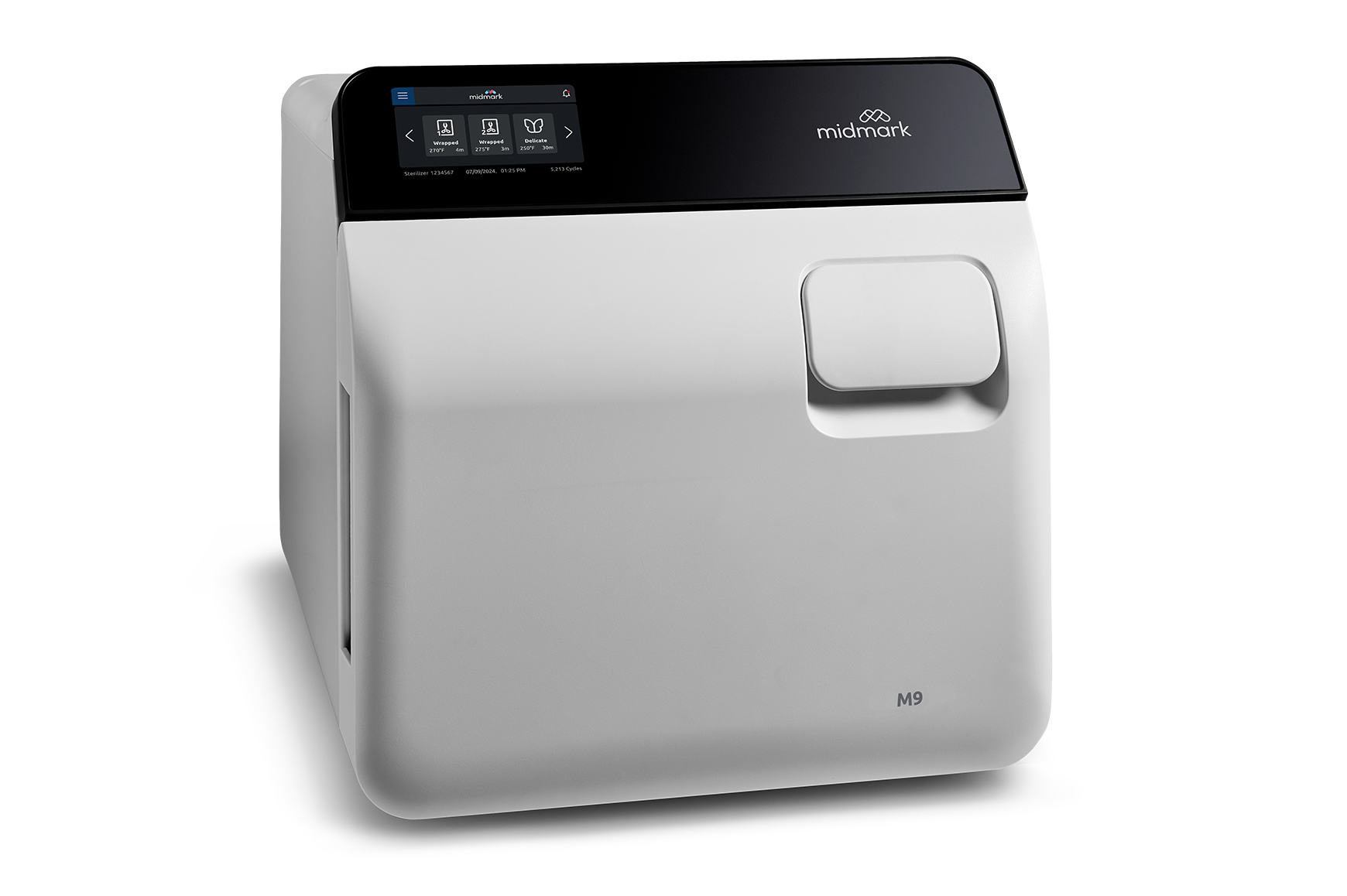
Automated sterilization equipment has transformed infection control workflows in dental practices worldwide. The Midmark M9 UltraClave represents one of the most trusted automatic...
Reviewed by Agnes Markovic
Pros
- Fully automatic operation reduces staff workload and minimizes potential for human error
- Patented automatic-opening door promotes safe, efficient drying without risk of steam burns
- Steam-flush pressure pulse system ensures reliable steam penetration for effective sterilization
- Compact footprint fits easily in space-constrained sterilization areas
- Intuitive LCD display with clear prompts enables confident operation with minimal training
- Four pre-programmed cycles cover the vast majority of dental sterilization needs
- Custom programmable cycles accommodate special requirements when needed
- Real-time error alerts with "Items Not Sterile" warning prevents use of improperly processed instruments
- Multiple Townie Choice Awards reflect industry recognition and user satisfaction
- Made in USA with established manufacturer support network
- ASME certified and FDA cleared for medical and dental applications
- Front-mounted fill port and drain tube simplify daily water maintenance
- Water level indicator visible at a glance for quick status check
- Next generation models offer 25,000-cycle lifespan for long-term value
- Compatible thermal printer available for automated cycle documentation
Cons
- Higher purchase price compared to manual autoclave alternatives
- Manufacturer warranty void if purchased from non-authorized dealers
- Smaller chamber capacity than M11 limits load size per cycle
- Thermal printer accessory required for automated documentation adds cost
- Annual door gasket replacement adds to maintenance expenses
- Electronic components can be costly to repair when failures occur
- Requires dedicated 15-amp electrical circuit for proper operation
- Older models use different error code system requiring generation-specific troubleshooting
- No built-in water distillation or purification system
- GFI protected outlets can cause operational problems requiring outlet relocation
Automated sterilization equipment has transformed infection control workflows in dental practices worldwide. The Midmark M9 UltraClave represents one of the most trusted automatic sterilizers in the dental industry, earning multiple Townie Choice Awards year after year.
Midmark Corporation, headquartered in Versailles, Ohio, has built a reputation for manufacturing reliable, American-made medical and dental equipment. The M9 UltraClave embodies this commitment to quality with its fully automatic operation, patented automatic-opening door, and steam-flush pressure pulse air removal system. The compact 9-inch chamber design makes it particularly well-suited for practices where counter space comes at a premium.
This comprehensive review examines everything dental professionals need to know about the Midmark M9 UltraClave, including technical specifications, key features, common error codes with detailed troubleshooting solutions, preventive maintenance protocols, and practical guidance for purchase decisions.
Midmark M9 UltraClave Technical Specifications
Understanding the technical capabilities of the Midmark M9 helps dental professionals determine whether this autoclave meets their practice requirements. The chamber measures 9 inches in diameter and 15 inches in depth, providing a total volume of 3.5 gallons (13.4 liters). The overall unit dimensions of 20.4 inches long, 15.3 inches wide, and 15.8 inches high create a compact footprint that fits comfortably in space-constrained steri-centers.
Complete Specifications Table
Specification | Details |
|---|---|
Chamber diameter | 9" (22.9 cm) |
Chamber depth | 15" (38.1 cm) |
Chamber volume | 3.5 gallons (13.4 liters) |
Overall dimensions | 20.4"L × 15.3"W × 15.8"H |
Minimum countertop area | 15.3" × 17.9" |
Unit weight | 73 lbs (33.1 kg) |
Shipping weight | 81 lbs (36.7 kg) |
Water reservoir capacity | 1.1 gallons (4.1 liters) |
Usable water volume | 0.6 gallons |
Electrical requirements | 115 VAC, 50/60 Hz, 15 amps, single phase |
Temperature range | 230°F–275°F (110°C–135°C) |
Pressure range | 14.5–32 PSI (1.0–2.2 bar) |
Trays included | 2 large, 2 small |
Large tray dimensions | 7.3"W × 12"L × 0.8"D |
Small tray dimensions | 5.6"W × 12"L × 0.8"D |
Pouch rack | 5-slot rack included |
The unit operates on standard 115-volt power but requires a dedicated 15-amp circuit for optimal performance. Midmark recommends against using extension cords or sharing circuits with other high-draw equipment. The microprocessor-controlled system ensures precise management of all operating parameters throughout each sterilization cycle.
Pre-Programmed Cycle Options
The M9 UltraClave comes with four factory-programmed cycles designed to handle over 98% of typical dental sterilization needs. Each cycle automatically sets the appropriate time, temperature, and drying parameters.
Cycle Type | Temperature | Sterilization time |
|---|---|---|
Unwrapped | 270°F (132°C) | 3 minutes |
Pouched | 270°F (132°C) | 5 minutes |
Packs | 250°F (121°C) | 30 minutes |
270°F (132°C) | 6 minutes |
For instruments or materials requiring different parameters, the programmable controls allow creation of custom cycles. Users can adjust exposure time from 3 to 90 minutes, temperature from 230°F to 275°F, dry time from 0 to 60 minutes, and venting speed between slow and fast options.
Key Features That Make The Midmark M9 A Top Choice
The Midmark M9 UltraClave incorporates several proprietary technologies and design elements that distinguish it from competing autoclaves. These features address the practical challenges dental practices face in maintaining efficient, compliant sterilization workflows.
Steam-Flush Pressure Pulse Air Removal System
Effective sterilization requires complete contact between steam and all instrument surfaces. The Midmark steam-flush pressure pulse system addresses trapped air pockets through a series of pressure pulses that flush air from the chamber before sterilization begins.
This technology proves so effective that the M9 can pass the air removal tests typically required for more complex vacuum steam autoclave systems. Practices can trust that instruments receive proper sterilization exposure regardless of how they are positioned in the chamber.
Patented Automatic-Opening Door
The automatic door mechanism represents one of the M9's most appreciated features. When the sterilization cycle completes, the door opens automatically and quietly, allowing steam to dissipate safely away from the operator. This design eliminates the risk of steam burns and promotes faster, more efficient instrument drying as heated chamber air circulates around packages.
Intuitive LCD Display And Controls
The clear LCD display shows essential information at a glance, including the selected cycle, current temperature, and remaining exposure time. Real-time alerts notify users immediately when critical system errors occur. If a cycle is interrupted, the display shows a clear "Items Not Sterile" warning, supporting compliance with CDC sterilization guidelines.
Automatic Water Fill System
Press the Start button and the M9 automatically fills the chamber with the precise amount of water needed. The water level sensor prevents both overfilling and underfilling. The front-mounted fill port and drain tube simplify daily water maintenance without moving the unit or reaching over hot surfaces.
Midmark M9 Vs M11: Choosing The Right Size
Dental practices often debate between the compact M9 and the larger M11 when selecting a Midmark autoclave. Both units share the same core technology, including the steam-flush pressure pulse system and automatic door opening.
Feature | Midmark M9 | Midmark M11 |
|---|---|---|
Chamber diameter | 9" | 11" |
Chamber depth | 15" | 18" |
Chamber volume | 3.5 gallons | 6.5 gallons |
Water reservoir | 1.1 gallons | 1.4 gallons |
Footprint | Smaller | Larger |
Best application | Space-limited, moderate volume | High-volume practices |
The M9 excels in practices where counter space is limited or sterilization volume remains moderate. The M11 makes sense for high-volume practices processing large quantities of instruments throughout the day.
Is The Midmark M9 Right For Your Dental Practice?
Selecting the appropriate autoclave requires honest assessment of your practice's sterilization demands, available space, and workflow preferences.
Best Suited For
Solo dental practitioners processing moderate instrument volumes
Small to medium practices with one to three operatories
Offices with limited counter space in the sterilization area
Practices seeking fully automatic operation to reduce staff workload
Specialty offices with moderate sterilization requirements
Practices wanting a reliable secondary or backup autoclave
Consider Alternatives If
High-volume practices requiring maximum throughput should consider the M11
Budget-conscious buyers may find manual autoclaves more economical initially
Practices needing built-in documentation without purchasing a separate printer
Common Problems And Troubleshooting Solutions
Even well-maintained autoclaves occasionally experience issues. Understanding the Midmark M9's error code system helps dental professionals minimize downtime.
Understanding Midmark M9 Error Codes
The M9 uses a numeric error code system that varies between older and newer models:
Older models (M9-001 through M9-019): Red LED display showing E001 through E012 error codes
Newer models (M9-020 and above): Green LCD display showing C-series error codes
The model number appears on the identification plate on the unit's back panel.
Error Code E001: Power Interruption
The E001 error indicates the unit lost power during a cycle.
Symptoms:
E001 displayed on screen after cycle
Cycle did not complete properly
Possible Causes and Solutions:
Facility power interruption: Power outages or electrical storms can interrupt cycles. After power returns, press the ON/STANDBY button to clear the error. Items should be reprocessed.
GFI/GFCI outlet issues: The M9 should not be plugged into ground fault interrupter outlets, which can trip unexpectedly during operation. Move the unit to a standard outlet on a dedicated circuit.
Unit accidentally unplugged: Verify the power cord is securely connected at both the unit and wall outlet.
Overheating from pressure leak: On older units, E001 during a cycle may indicate overheating from steam leaks triggering the overheat thermostat. Inspect the door gasket for wear or damage.
Error Code E002: Stop Button Pressed
The E002 error appears when the STOP button is pressed during an active cycle.
Solutions: Train team members to avoid touching controls during active cycles. Once beeping stops, unplug the unit briefly, then restart and reprocess. If E002 appears without anyone touching controls, the display board may need replacement.
Error Code E003: On/Standby Button Pressed
Similar to E002, this error indicates the ON/STANDBY button was pressed during a cycle. Clear the error by unplugging after beeping stops, then restart. Repeated errors without button presses suggest a defective display board.
Error Code E004: Door Ajar
The E004 error indicates the door is not properly closed or was opened during a cycle.
Solutions: Close the door completely and push the latch all the way down. Inspect the door gasket for cracks or debris, replacing if worn. The door microswitch may need professional replacement if the error persists with a properly closed door.
Error Code E005: Low Water
This error indicates insufficient water to complete the sterilization cycle.
Solutions: Add distilled water to the reservoir. If the error persists with adequate water level, clean the water level sensor which may be coated with mineral deposits. Inspect for leaks beneath the unit.
Error Code E008: Door Did Not Open
The E008 error appears when the automatic door fails to open at cycle completion. Instruments likely received proper sterilization, but the dry cycle was interrupted.
Solutions: Check that both door springs are present and positioned at 45-degree angles. Clean door pins and latch components if binding occurs. Worn door mechanism components on older units may require professional replacement.
Error Code E009: Pressure During Dry Cycle
This error indicates residual pressure during the drying phase. Instruments may be sterilized but wet.
Solutions: Verify door springs allow full vent position opening. The unit may require sensor recalibration through a qualified technician.
Problem: Water Leaking Under Unit
Water pooling beneath the autoclave requires prompt attention.
Solutions: The most common cause is worn door or dam gaskets, which should be replaced together using OEM part number 002-0361-01. Also check for water at the condensing coil spout (clean or replace vent valve), bubbles in the reservoir indicating fill valve backflow, and loose hose connections.
Problem: Instruments Not Drying Properly
Wet packs after cycle completion indicate a drying problem that must be resolved.
Solutions: Reduce load size and ensure adequate spacing using the pouch rack. Verify both door springs are present and at 45-degree angles. Clean or replace clogged mesh filters. Consider creating a custom cycle with extended dry time for heavy loads.
Problem: Unit Not Building Temperature Or Pressure
Failure to reach proper sterilization parameters must be addressed immediately.
Solutions: Have a technician check the heating element. Inspect door gasket area for steam leaks. Relocate the unit from GFI outlets to standard outlets. PC board malfunction may require professional diagnosis and replacement.
Preventive Maintenance Schedule For Optimal Performance
Consistent preventive maintenance extends equipment life, prevents unexpected breakdowns, and ensures reliable sterilization results. The following schedule reflects Midmark's recommendations combined with industry best practices.
Daily Maintenance Tasks
Performing these quick tasks each day prevents many common problems:
Wipe chamber interior and door with clean, damp cloth
Check water reservoir level and refill as needed
Visually inspect door gasket for damage or debris
Verify all indicator lights illuminate properly at startup
Drain reservoir if not using distilled water exclusively
Weekly Maintenance Tasks
Weekly attention focuses on cleanliness and function verification:
Clean exterior surfaces with appropriate cleaner
Monitor water quality and change if discolored
Verify all display indicators and alerts function correctly
Perform biological indicator (spore) testing per CDC guidelines
Document maintenance activities in log
Monthly Maintenance Tasks
The M9 displays a "PERFORM MONTHLY MAINTENANCE" reminder to prompt these important tasks:
Clean chamber thoroughly following manufacturer instructions
Inspect door gasket and dam gasket for wear or deterioration
Check mesh filters and replace if dirty or clogged
Clean water reservoir completely
Verify door opens to full vent position
Test all cycles for proper operation
Document completion in maintenance records
Annual Maintenance And Gasket Replacement
Midmark recommends replacing the door and dam gasket every 12 months regardless of visible condition. The preventive maintenance kit (OEM part number varies by model generation) typically includes:
Door gasket
Dam gasket
Gasket ring
Door springs (2)
Mesh filters (2)
Door Gasket Replacement Procedure
Replacing the door gasket requires careful attention to proper installation technique:
Unplug the sterilizer and allow to cool completely
Remove the dam gasket by pulling it off the door studs
Remove the door gasket from the gasket housing
Clean the gasket housing and chamber face thoroughly
Insert the gasket ring into the bottom of the door gasket V-groove, noting the weld location
Position the door gasket with the ring weld centered at the door hinges
Install the gasket into the housing starting at the bottom, then sides, finishing at top
Ensure the gasket fits evenly and flush all around
Reinstall the dam gasket over door studs and tuck the bottom edge into the center V-groove
Essential Replacement Parts And Accessories
Keeping critical replacement parts available minimizes downtime when maintenance needs arise. The following table lists commonly needed components with their OEM part numbers.
Part | OEM part number | Replacement interval |
|---|---|---|
Door gasket kit (includes dam) | 002-0361-01 | Every 12 months |
Door gasket only | 053-0366-00 | As needed |
Mesh filters | Included in PM kit | As needed |
Door springs | Included in PM kit | As needed |
Gasket ring | Included in PM kit | With gasket replacement |
Recommended Accessories
Several accessories enhance the M9's functionality and documentation capabilities:
Thermal printer for automated cycle documentation (generation-specific compatibility)
Additional tray sets for increased processing flexibility
Extra 5-slot pouch racks for specialized loading configurations
Biological indicator incubator for in-office spore testing
Chamber cleaning solution formulated for autoclave use
Important Purchasing Consideration
Midmark explicitly states that warranty coverage is only valid when the unit is purchased through a Midmark-authorized dental distributor. Purchasing from non-authorized sellers, including some online marketplaces, voids the manufacturer warranty entirely. Verify distributor authorization before purchasing to protect your investment.
Warranty Information And Technical Support
Understanding warranty coverage helps dental professionals plan for equipment costs and maintenance responsibilities.
Standard Warranty Coverage
New Midmark M9 units purchased from authorized distributors include a one-year parts and labor warranty. This coverage applies only to units purchased through proper channels, as authorization status verification is required for warranty claims.
Current promotional offers include a free Sterilizer Maintenance Kit when registering a new M9 or M11 purchase. This kit contains the door gasket, dam gasket, gasket ring, and mesh filters needed for the first annual maintenance.
Technical Support Resources
Midmark provides comprehensive support for troubleshooting and service needs:
Technical Support Phone: 1-800-643-6275
Technical Library: technicallibrary.midmark.com
User guides and documentation: Available for download online
Authorized service technician network: Nationwide coverage for professional repairs
Next Generation Models
The newest M9 models (M9-040 and above) feature significant improvements including:
25,000-cycle chamber life (2.5 times greater than previous models)
5-inch fingerprint-resistant touchscreen display
Glove-compatible touch controls
Enhanced compliance features with user authentication
Automated cycle recordkeeping with unlimited storage
Device reminders and maintenance notifications
Bottom Line
The Midmark M9 UltraClave has earned its position as one of the most trusted automatic dental autoclaves through a combination of innovative technology, reliable performance, and thoughtful design. The steam-flush pressure pulse air removal system ensures effective sterilization, while the patented automatic-opening door promotes safe, efficient instrument drying. Multiple Townie Choice Awards reflect the dental community's confidence in this equipment.
Success with the M9 depends on proper operation, consistent preventive maintenance, and purchasing through authorized channels to maintain warranty protection. The troubleshooting guidance in this review addresses the most common issues practitioners encounter, enabling quick resolution when problems arise.
For dental practices seeking a compact, fully automatic sterilizer that delivers consistent results with minimal staff intervention, the Midmark M9 UltraClave represents an excellent choice backed by strong manufacturer support. Those with higher-volume needs should explore the M11, while budget-conscious buyers might consider manual alternatives that trade convenience for lower initial cost.
Consult with a Midmark-authorized dental distributor to discuss your specific sterilization requirements and determine whether the M9 fits your practice needs.
Verdict
<p>The Midmark M9 UltraClave delivers premium automated sterilization with proven reliability and space-efficient design, but its higher price point and moderate capacity demand careful consideration of your practice's volume requirements and budget priorities.</p><p>In clinical practice, the M9 demonstrates why it has earned multiple Townie Choice Awards year after year. The steam-flush pressure pulse system provides exceptional air removal that rivals vacuum autoclaves, giving genuine confidence that complex instrument loads receive proper sterilization regardless of positioning. The patented automatic-opening door eliminates steam burn risks while promoting faster drying—a seemingly small feature that staff come to appreciate dozens of times daily. Cycle times of 12-22 minutes keep pace with typical one-to-three operatory workflows without creating bottlenecks. For practices with limited counter space, the compact 9-inch chamber footprint solves real estate problems that plague many sterilization centers. The intuitive LCD interface requires minimal training, particularly valuable for offices with staff turnover, and the clear "Items Not Sterile" warnings support compliance without ambiguity.</p><p>That automation and reliability, however, come at a cost. The M9 commands a premium price compared to manual alternatives—an investment that makes sense when staff efficiency and workflow optimization are priorities, but one that may not align with tight startup budgets. The 3.5-gallon chamber capacity becomes a constraint in high-volume practices running four or more operatories simultaneously, where multiple cycles per day slow instrument turnover and increase component wear. The optional thermal printer for automated documentation adds expense but proves essential for practices facing frequent compliance audits or processing implantable devices. The warranty restriction requiring purchase through authorized distributors also demands procurement diligence, as gray-market units carry no manufacturer protection despite appearing identical.</p><p>The Midmark M9 excels as a primary workhorse for practices that value set-it-and-forget-it operation and American-made reliability over lowest initial cost. It particularly shines in space-constrained environments where its compact design creates sterilization capacity where larger units simply won't fit. When matched to appropriate practice volume and properly maintained with annual gasket replacement, it delivers consistent performance that justifies the premium investment.</p><p><strong>Best for:</strong> solo practitioners and small group practices (1-3 operatories), space-limited sterilization centers, offices prioritizing staff efficiency and automation, specialty practices with moderate instrument volumes, practices needing reliable secondary sterilization capacity, offices with high staff turnover requiring intuitive equipment.</p><p><strong>Consider alternatives if:</strong> you operate four or more operatories with high daily instrument volume (explore the M11), initial budget constraints outweigh automation benefits (manual autoclaves offer lower entry cost), you require built-in documentation without additional printer investment, you're purchasing from non-authorized sources (warranty will be void), or your practice processes exceptionally large instrument sets that exceed the 9-inch chamber capacity regularly.</p>
Frequently Asked Questions
What is the cycle time for the Midmark M9?
The Midmark M9 completes a full cycle in approximately 22 minutes from a cold start or 12 minutes from a hot start. The unwrapped cycle runs at 270°F for 3 minutes, the pouched cycle at 270°F for 5 minutes, the packs cycle at 250°F for 30 minutes, and the handpiece cycle at 270°F for 6 minutes.
How often should I replace the door gasket on a Midmark M9?
Midmark recommends replacing both the door gasket and dam gasket every 12 months regardless of visible condition. Replace them sooner if you notice cracking, hardening, steam leaks around the door, or water pooling under the unit.
What does error code E001 mean on my Midmark M9?
Error code E001 indicates a power interruption occurred during the cycle. Common causes include facility power loss, the unit being unplugged, use of a GFI outlet that tripped, or in some cases overheating from a pressure leak. Press the ON/STANDBY button to clear the error after addressing the cause.
What is the difference between the Midmark M9 and M11?
The primary difference is chamber size. The M9 has a 9-inch diameter chamber with 3.5-gallon capacity, while the M11 has an 11-inch diameter chamber with 6.5-gallon capacity. Both share the same steam-flush pressure pulse technology and automatic door opening. Choose the M9 for space-limited practices with moderate volume, or the M11 for high-volume sterilization needs.
Why is my Midmark M9 leaking water?
Water leaks most commonly result from a worn door gasket or dam gasket. Other causes include a faulty vent valve, fill valve malfunction, or loose internal hose connections. Inspect and replace the gaskets first, as this resolves most leak issues.
Does the Midmark M9 require distilled water?
While not absolutely required, using distilled or demineralized water is strongly recommended to prevent mineral buildup that can clog valves and sensors. Tap water with high mineral content leads to more frequent cleaning and maintenance requirements and can cause operational problems over time.
How do I clear error codes on my Midmark M9?
For most error codes, press the ON/STANDBY button after the beeping stops to clear the display. If the error persists, unplug the unit for 30 seconds, then restart. Recurring errors that cannot be cleared typically indicate a component failure requiring professional service.
Is the Midmark M9 warranty valid if I buy from any seller?
No. The Midmark warranty is only valid when purchased through a Midmark-authorized dental distributor. Purchasing from non-authorized dealers, including some online marketplaces and resellers, voids the manufacturer warranty entirely. Always verify authorization before purchasing.
What is the steam-flush pressure pulse air removal system?
This is Midmark's patented technology that efficiently removes air from the sterilization chamber before steam is introduced. The system pulses steam to flush out air pockets, ensuring proper steam penetration to all instrument surfaces. This technology is so effective it can pass air removal tests required for more complex vacuum steam autoclave systems.
How do I know if my Midmark M9 is an older or newer model?
Check the identification plate on the back panel for the model number with version suffix. Older models (M9-001 through M9-019) have a red LED display, while newer models (M9-020 and above) have a green LCD display. This distinction matters for troubleshooting, as error codes differ between generations.